Nodes reference.
Every Odara ETL node: files, databases, data warehouses, object storage, network and APIs, notifications, transforms, control flow and local system nodes.
4. Nodes Reference
Odara ETL 0.4 ships with 70 node types: 66 in the editor's Nodes palette, the Mapper (added from the canvas) and 3 Maestro steps, grouped into four categories: ingest (sources), transforms, deliver (targets), and orchestrate (control flow). Each node has a dedicated configuration schema shown in the Properties panel.
4.1 Files
4.1.1 CSV Source SOURCE
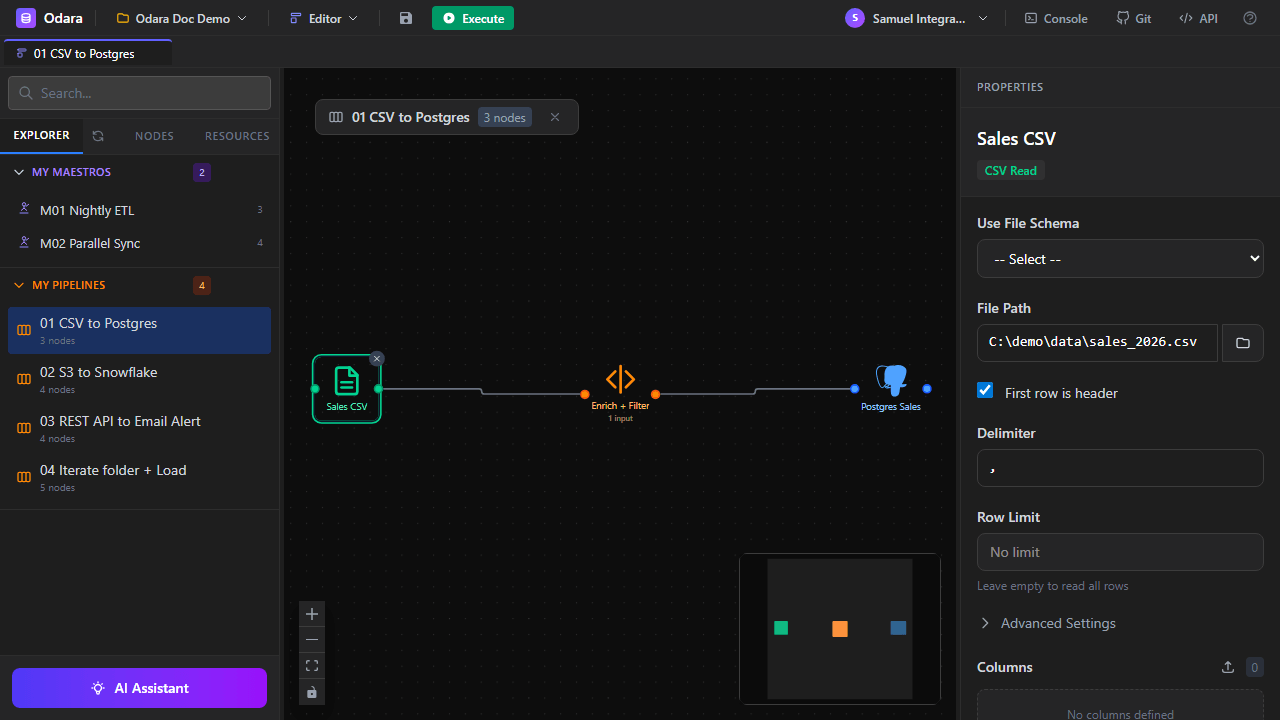
Reads data from a CSV (Comma-Separated Values) file into RecordBatches. Supports custom delimiters, headers, row skipping, and column selection.
| Property | Description | Default |
|---|---|---|
| File Path | Absolute or relative path to the CSV file. Supports variable interpolation (@date). | — |
| First row is header | Whether the first row contains column names. | true |
| Delimiter | Column separator: comma, semicolon, tab, pipe. | , |
| Row Limit | Maximum number of rows to read. Empty = unlimited. | — |
| Columns | Specific columns to select with per-column type hints. Empty = all. | All |
| Use File Schema | Optional — apply a saved File Schema resource for consistent column types. | — |
@date, @env, or any context variable to read dated / per-environment files: C:\data\[email protected]
4.1.2 Excel Source SOURCE
Reads data from a .xlsx / .xls file. Supports sheet selection, header row position, row skipping, and column filtering.
| Property | Description | Default |
|---|---|---|
| File Path | Path to the workbook. | — |
| Sheet Name | Name of the sheet to read. Empty = first sheet. | First sheet |
| Header Row | 1-based row number containing column headers. | 1 |
| Skip Rows | Extra rows to skip after the header. | 0 |
4.1.3 XML Source SOURCE
Flattens hierarchical XML into tabular rows by specifying the repeating row element path.
| Property | Description | Default |
|---|---|---|
| File Path | Path to the XML file. | — |
| Row Element | Name of the repeating element (e.g., order for <orders><order>…). | — |
| Namespaces | Optional XML namespace declarations. | — |
4.1.4 Magic File Source SOURCE
Reads a file by auto-detecting its format from the content (magic bytes + a sampled head), not the extension — so it works even when the file has no extension at all. Supports CSV, JSON, NDJSON, Parquet, and Excel. Use this when the format may vary or when you want minimal configuration. (Tip: drop an @file.path variable here inside an Iterate loop to read every file in a folder, whatever its format.)
| Property | Description | Default |
|---|---|---|
| File Path | Path to the file. | — |
| Sample Size | Rows to sample for schema inference. | 1000 |
4.1.5 CSV Target TARGET
Writes RecordBatches to a CSV file. See Properties in the editor — mirrors the source options plus Write mode (overwrite / append) and Include BOM.
4.1.6 Excel Target TARGET
Writes to a .xlsx file with configurable sheet name and header row.
4.1.7 XML Target TARGET
Writes rows as XML elements under a specified root and row element name.
4.1.8 Magic File Target TARGET
Picks the output format from the file extension (or set a Format Override). Supports CSV, JSON, NDJSON, Parquet and Excel, plus an Append option. Note: writing to a .json path produces JSON Lines (NDJSON) — one object per line — not a single JSON array; that's the format BigQuery, DuckDB and jq ingest natively. If you need a standalone array, post-process with jq -s '.' out.json or use a .ndjson extension to make the intent explicit.
4.2 Databases
All database source nodes share a common pattern: configure the connection inline or pick a saved Data Store (Section 5.2), then write the SQL query (or set collection + filter for MongoDB). Database targets write RecordBatches back to a table.
4.2.1 PostgreSQL Source SOURCE
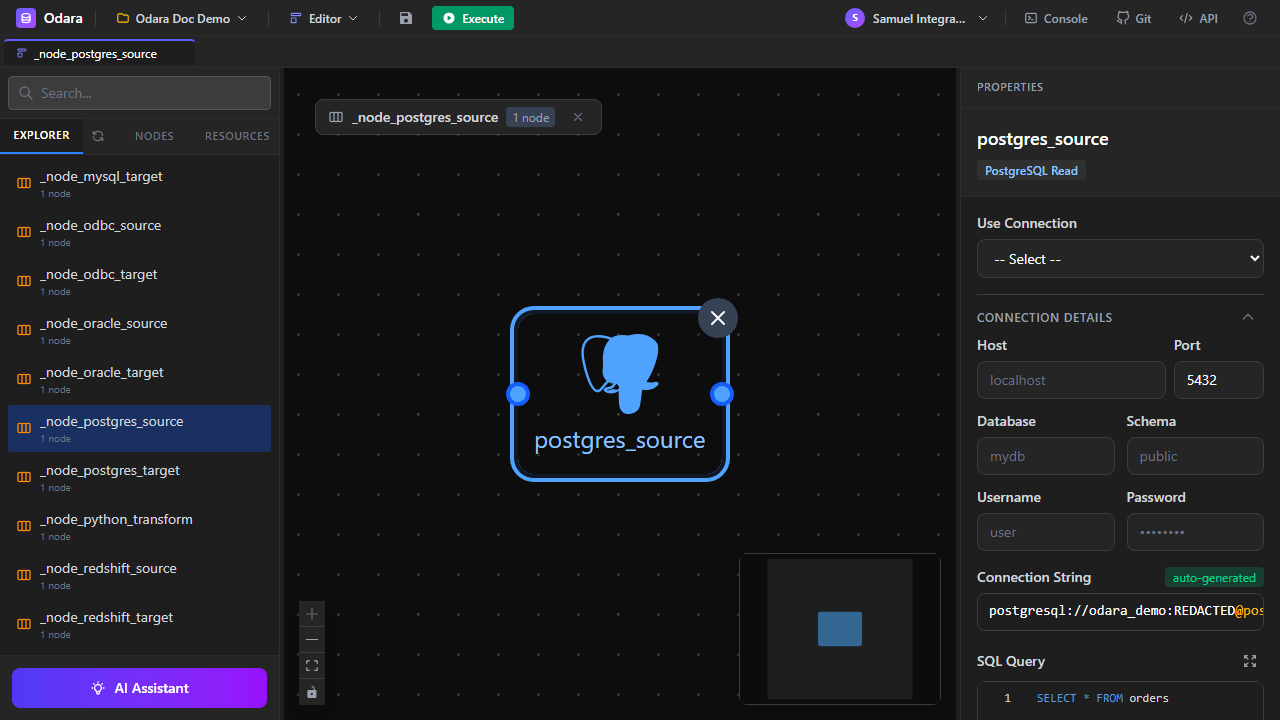
Connects to a PostgreSQL database and executes a SQL query. All PostgreSQL data types map automatically to Arrow equivalents. SSL modes supported: disable, prefer, require, verify-ca, verify-full.
4.2.2 MySQL Source SOURCE
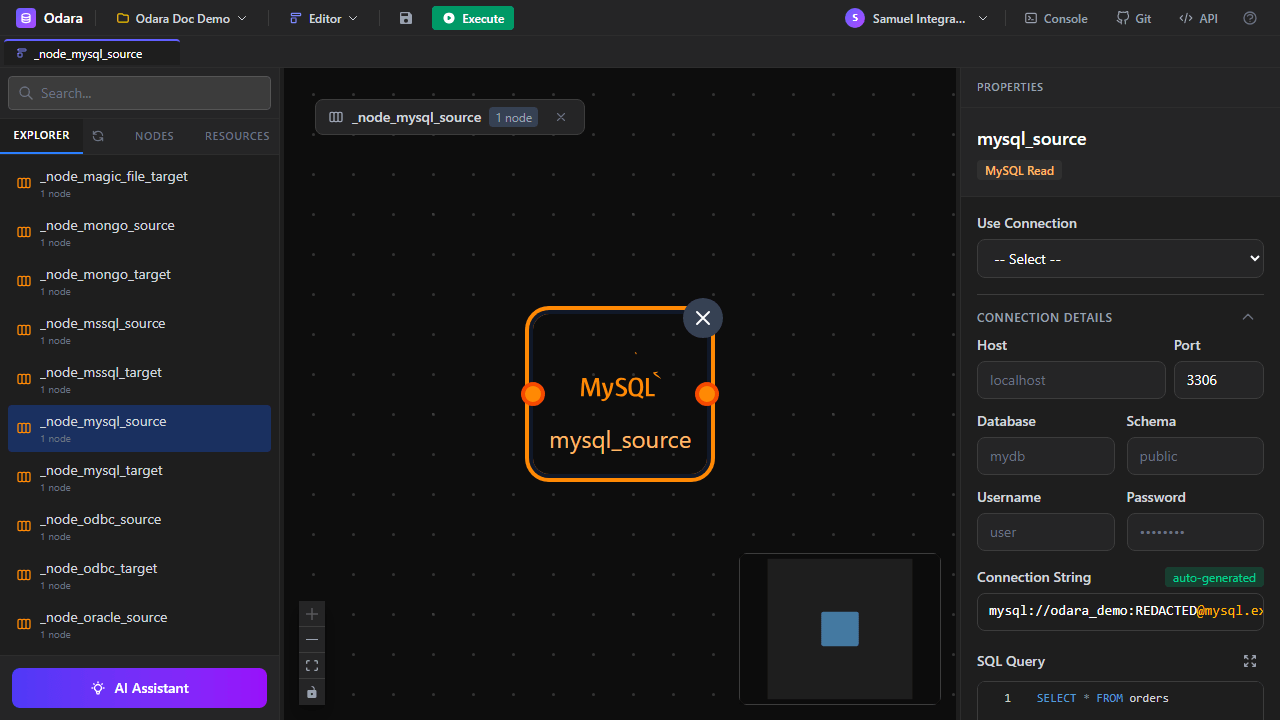
Connects to a MySQL or MariaDB database. Port defaults to 3306. All MySQL data types are mapped to their Arrow equivalents.
4.2.3 Oracle Source SOURCE
Connects to Oracle Database via the sibyl driver. Requires the Oracle Instant Client installed on the machine. Supports service names, SIDs, and TNS names.
4.2.4 SQL Server Source SOURCE
Connects to Microsoft SQL Server via the TDS protocol (tiberius crate). Supports named instances (e.g., SQLEXPRESS), Windows integrated auth (Trusted Connection), and certificate trust override for dev environments.
4.2.5 MongoDB Source SOURCE
Reads from a MongoDB collection. Supports aggregation pipelines, filters, and field projections. Documents are flattened into rows — nested objects can be extracted via dot notation or kept as JSON strings.
4.2.6 ODBC Source SOURCE
Generic ODBC connector — use when you need a database not covered by the dedicated connectors. Requires the appropriate ODBC driver installed (SQL Server, DB2, Informix, Sybase, etc.).
4.2.7 SQLite Source SOURCE
Reads from a local SQLite database file. No server connection — just a path to the .db / .sqlite file.
4.2.8 IBM DB2 VIA ODBC
There is no dedicated DB2 node in the palette. Reach IBM DB2 with the ODBC Read / ODBC Write nodes and IBM's DB2 ODBC driver installed on the machine that runs the pipeline.
Database targets PostgreSQL, MySQL, Oracle, SQL Server, MongoDB, ODBC and SQLite each have a corresponding Write node. All accept a connection + target table with a Table Operation (none / truncate / create / drop & create) and a Data Operation (insert / upsert / replace).
4.3 Data Warehouses
Data warehouse connectors are tuned for analytical workloads: bulk reads, column projection pushdown, and batch inserts.
4.3.1 Snowflake Source SOURCE
Connects to Snowflake with account + warehouse + database + schema + user/password. Supports role impersonation via the role field. SQL queries run on the specified warehouse.
4.3.2 ClickHouse Source SOURCE
Reads from a ClickHouse cluster via the HTTP interface. Provide the URL (including port 8123 or 8443 for TLS), database, user, and password.
4.3.3 BigQuery Source SOURCE
Reads from Google BigQuery. Two modes: Table (direct read via Storage Read API) and Query (SQL query, optionally with a temp dataset for results). Authentication uses a service-account key: Credentials holds either the path of the key file on the machine that runs the pipeline, or the key JSON itself — normally a secret variable such as @{GCP_KEY}, which also works in isolated runs (15.5).
4.3.4 Redshift Source SOURCE
Amazon Redshift via the PostgreSQL wire protocol + TLS. Works with classic Redshift clusters and Redshift Serverless endpoints. DirectWire reads small/medium result sets directly; UnloadS3 streams large reads via an S3 UNLOAD. Known limitation: the DirectWire reader returns NULL for DECIMAL/NUMERIC columns (including SUM(decimal)); cast to a text type — CAST(col AS VARCHAR) — or use UnloadS3 if you need exact decimals. Integers, doubles, dates and timestamps read correctly.
4.3.5 DuckDB Source SOURCE
Embedded analytical database — DuckDB. Just provide a path to the .duckdb file and a SQL query. Zero-configuration for local analytics.
4.3.6 Snowflake Target TARGET
Writes to Snowflake. Table Operation (None / Truncate / Create / Drop & Create) controls DDL; Data Operation chooses Insert vs Copy Into (stage + COPY INTO, dramatically faster on real volumes).
4.3.7 ClickHouse Target TARGET
Writes to ClickHouse over HTTP(S). Configurable table operation, batched inserts (bulk_size), optional async_insert, and an optional cluster for distributed tables.
4.3.8 BigQuery Target TARGET
Writes to BigQuery with a load job whose rows are uploaded with the request: no Cloud Storage bucket is needed, load jobs are free, and a table just recreated by Drop & Create receives its rows at once. The Storage Write API option is not available yet: it uses a load job for a new table and streaming inserts into an existing one. Supports partition/cluster fields and Insert / Replace; Upsert is refused (BigQuery has no key columns in this node). Credentials as for BigQuery Source.
4.3.9 Redshift Target TARGET
Writes to Redshift two ways: DirectWire (multi-row INSERT, fine for dev/small loads) or CopyS3 (stage Parquet in S3, then COPY — recommended for production volumes). Set DISTKEY/DISTSTYLE/SORTKEY, a table operation, and Insert / Upsert / Replace, plus optional pre/post SQL (e.g. ANALYZE). DirectWire Upsert stages into a temp table and merges by your sort keys.
4.3.10 DuckDB Target TARGET
Writes to a local .duckdb file. Configurable table operation and data operation, optional use_appender (DuckDB's fast bulk path) and threads. Great for shipping a result mart as a single portable file.
4.8 Transforms
4.8.1 SQL Transform TRANSFORM
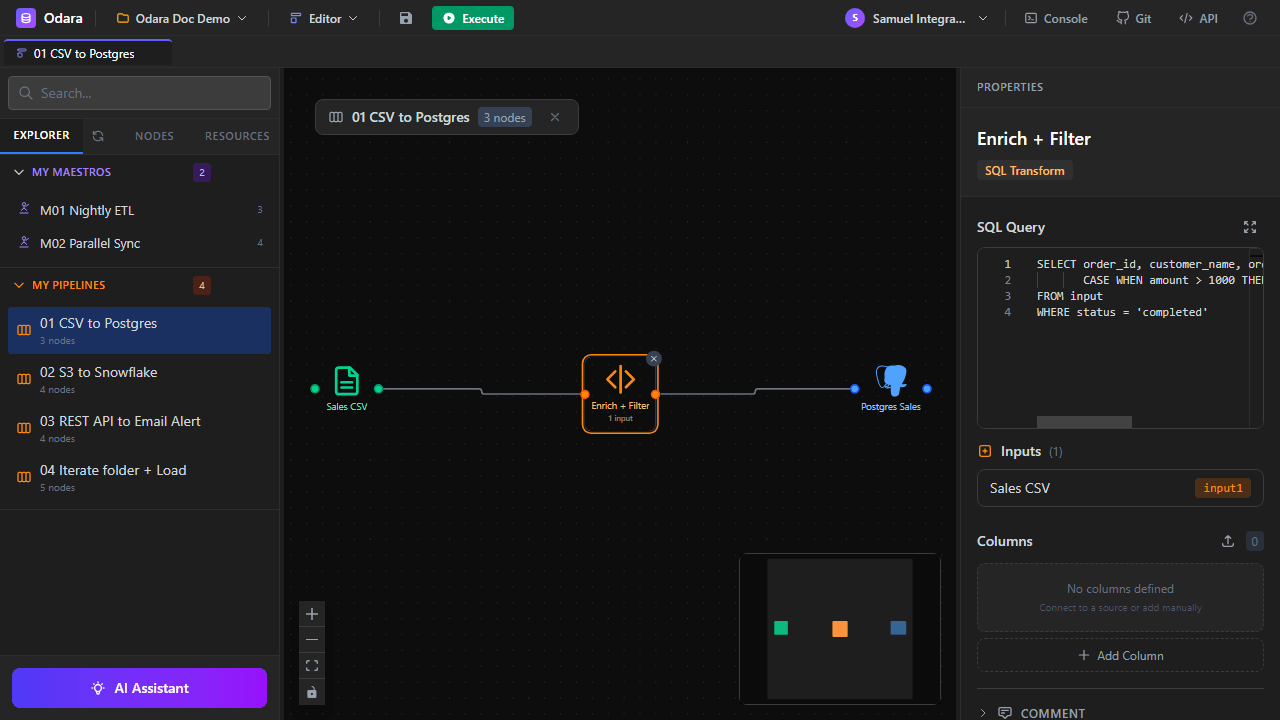
Executes a SQL query against the input RecordBatch(es) using Apache DataFusion. Reference input tables by their node name or use input for a single upstream.
| Property | Description | Default |
|---|---|---|
| Query | Any DataFusion-compatible SQL statement. | SELECT * FROM input |
Example — filter and enrich:
SELECT order_id, customer_name, amount,
       CASE WHEN amount > 1000 THEN 'high' ELSE 'standard' END AS tier
FROM input
WHERE status = 'completed'4.8.2 Python Transform TRANSFORM
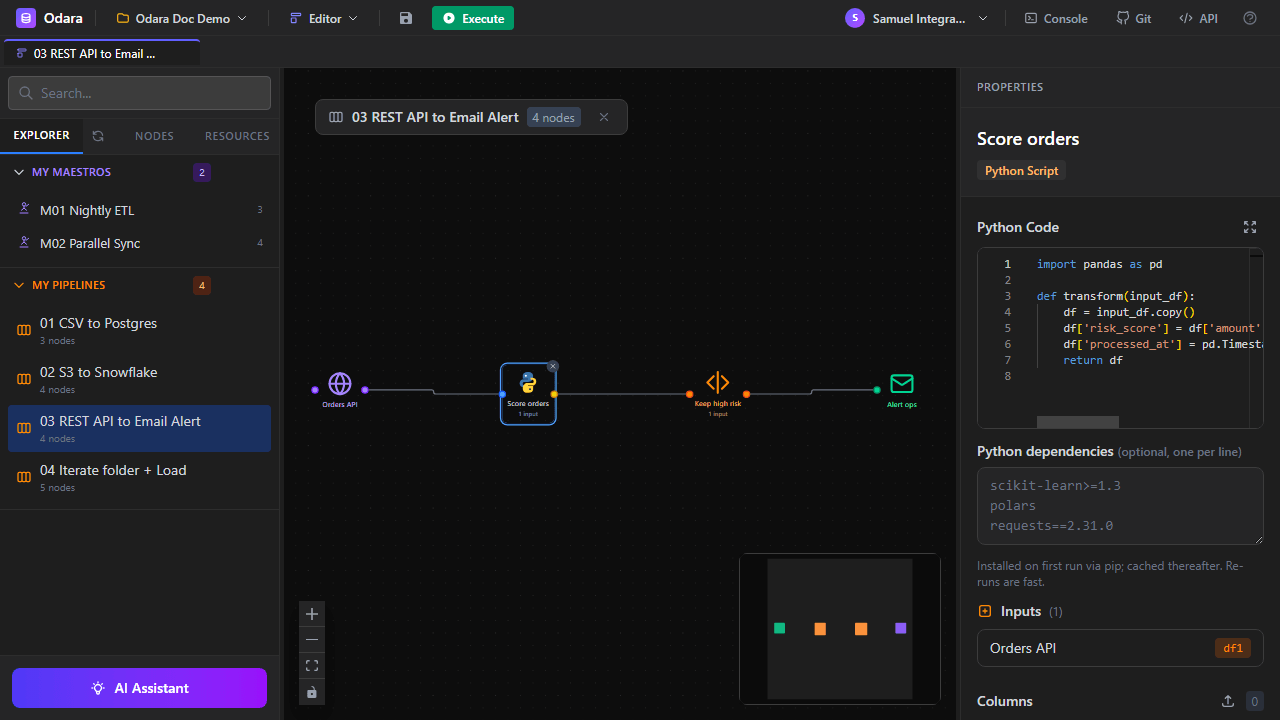
Runs Python code in an isolated subprocess. Data is passed in and out as pandas.DataFrame via PyArrow IPC (Arrow format, no row or text conversion).
| Property | Description | Default |
|---|---|---|
| Code | Python function transform(input_df) returning a DataFrame. | — |
| Python Dependencies | Optional pip package list; installed on first run. | — |
import pandas as pd

def transform(input_df):
    df = input_df.copy()
    df['risk_score'] = df['amount'].apply(
        lambda x: 'high' if x > 5000 else 'low'
    )
    df['processed_at'] = pd.Timestamp.utcnow()
    return df
4.8.3 Mapper TRANSFORM
A Talend-tMap-style transform with N inputs and M outputs: joins between the inputs, an expression for every output column, and a filter per output. Add it from the canvas (type on the canvas, or use the + button of a selected node); double-click it to open the Mapper editor.
4.4 Object Storage
Odara treats S3, Azure Blob, and Google Drive as first-class object stores with a consistent pattern: List enumerates objects, Read/Download fetches them, Write/Upload uploads, Copy duplicates within or across containers, Delete removes them.
4.4.1 S3 List SOURCE
Lists objects under a bucket + prefix. Optionally fetches metadata (size, last modified, ETag). Output is one row per object, with columns bucket, key, and optional metadata fields.
4.4.2 S3 Read SOURCE
Downloads a single S3 object to local_path. Can be used in batch mode by setting key_source to From column — then reads one object per input row (typical pipeline: S3 List → S3 Read).
4.4.3 S3 Write TARGET
Uploads a local file to S3. Supports multipart uploads for large files. Same batch mode as Read.
4.4.4 S3 Copy TARGET
Server-side copy between S3 keys (no download/re-upload). Efficient for large objects.
4.4.5 S3 Delete TARGET
Removes an S3 object. Batch mode iterates input rows.
4.4.6 Azure Blob List SOURCE
Enumerates blobs in an Azure Storage container. Authentication modes: account key, SAS token, or connection string.
4.4.7 Azure Blob Read SOURCE
Downloads a blob to local disk. Same batch pattern as S3.
4.4.8 Azure Blob Write TARGET
Uploads to Azure Blob Storage.
4.4.9 Azure Blob Copy TARGET
Server-side blob copy within or across containers.
4.4.10 Azure Blob Delete TARGET
Removes a blob.
4.5 Productivity
Google Drive nodes authenticate in one of two ways:
- OAuth (a person's account):
client_id,client_secretandrefresh_token— Odara refreshes the access token automatically. Keep the secret and the refresh token in secret variables. - Service account: Credentials holds the path of the key file, or the key JSON itself through a secret variable such as
@{GCP_KEY}(works in isolated runs).
4.5.1 Google Drive List SOURCE
Lists files in a Drive folder by folder_id.
4.5.2 Google Drive Read SOURCE
Downloads a file by file_id. Batch mode supported.
4.5.3 Google Drive Write TARGET
Uploads a local file to a Drive folder.
4.5.4 Google Drive Copy TARGET
Copies a file within Drive (no re-download).
4.5.5 Google Drive Delete TARGET
Moves a file to trash.
4.6 Network & APIs
4.6.1 FTP List SOURCE
Enumerates files on an FTP / FTPS / SFTP server. Supports password and SSH key authentication. Recursive listing optional.
4.6.2 FTP Read SOURCE
Downloads a file. Batch mode: one input row = one file fetched.
4.6.3 FTP Write TARGET
Uploads a local file. Can create intermediate directories on the remote.
4.6.4 FTP Rename TARGET
Renames (or moves) a remote file.
4.6.5 FTP Delete TARGET
Removes a remote file.
4.6.6 REST API (GET) SOURCE
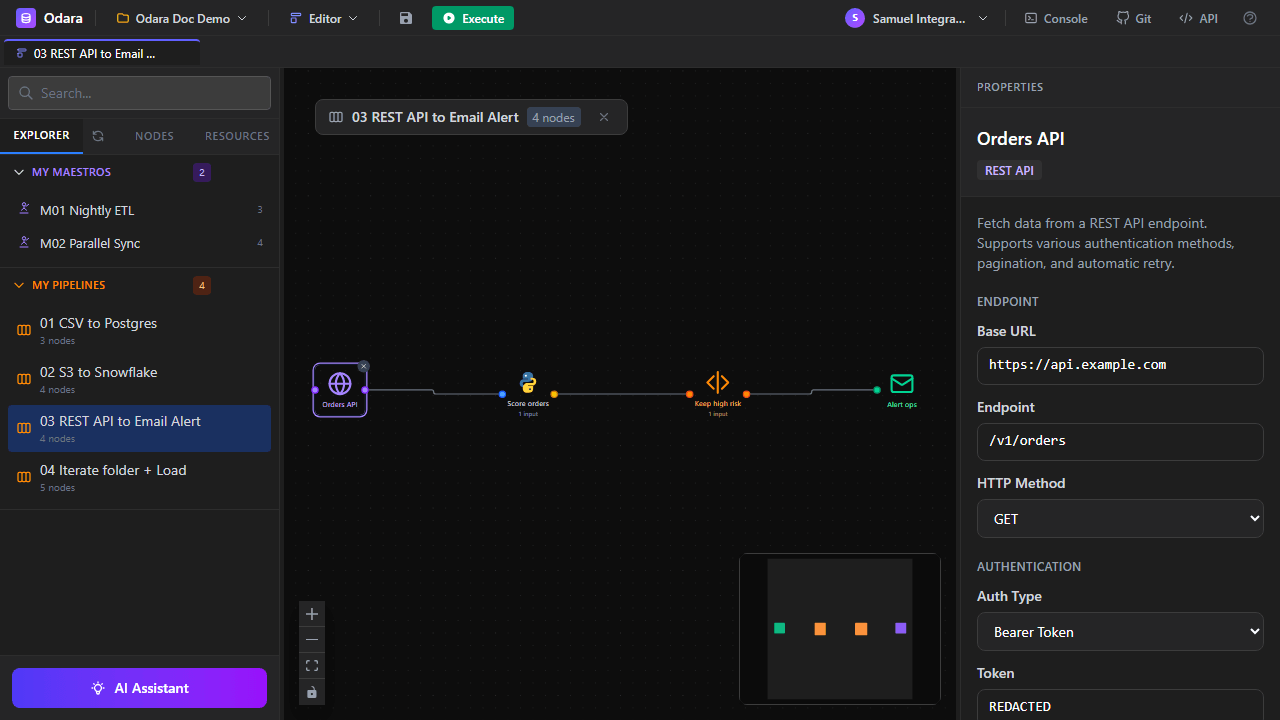
Fetches JSON from a REST endpoint. Built-in pagination strategies: page_number, offset, cursor, link_header, next_url. Authentication: none, basic, bearer, API key (header / query), OAuth2.
4.6.7 REST API (POST) TARGET
Sends rows to a REST endpoint. Batching: per row (one request per row) or array (N rows in one request body). Template-based JSON body with variable interpolation.
4.7 Notifications
4.7.1 Email TARGET
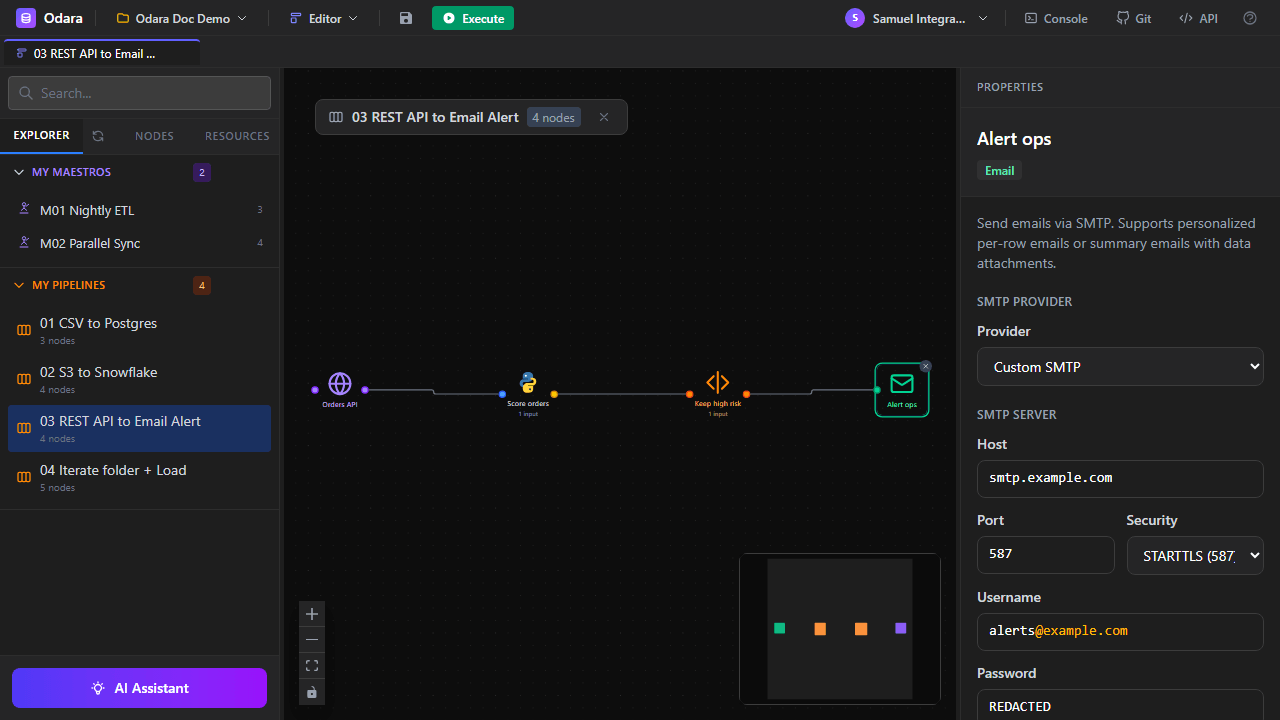
Sends email via SMTP. Provider presets: Gmail, Outlook, SendGrid, AWS SES, or custom. Security modes: none, STARTTLS, TLS. Supports per-row recipients (To column), attachments from file paths or input columns, and variable interpolation in subject/body.
Batch modes:
- per_row — one personalized email per input row (bulk marketing, per-user alerts).
- summary — one email with all rows aggregated (daily digest, reports).
4.9 Control Flow
4.9.1 Sleep CONTROL
Pauses the pipeline for a configurable number of seconds. Useful for rate-limiting API calls or waiting for external processes.
4.9.2 Run After CONTROL
Synchronization point — all upstream branches must finish before downstream nodes start. Use to join parallel paths.
4.9.3 Iterate CONTROL
Runs the downstream subgraph once per input row. Connect a source to Iterate with a dashed iterate-edge (a distinct edge kind that feeds one row at a time); everything after Iterate is a normal data graph that re-runs per row. Each row's columns become @<prefix>.<column> variables (set the Variable Prefix, e.g. file → @file.path, @file.name, @file.stem) that downstream node configs and SQL/paths can interpolate. Choose Sequential or Parallel execution and an On Error policy (skip failed and continue loop vs. abort). Ideal for looping over a folder of files, a list of IDs, or API endpoints. (Don't combine Parallel with an appending target.)
4.9.4 Fail CONTROL
Stops the run with an error message and exit code (Talend's tDie). It runs only when reached, so it usually sits behind a trigger with a condition; with Only if rows it fails only when rows reach it.
4.9.5 Run External Job CONTROL
Runs an exported Talend job (<Job>_run.sh / .bat) or any script from a folder allowed by the server's ODARAX_EXTERNAL_JOB_DIRS setting. For Talend it adds --context and --context_param arguments. Options: extra arguments, working folder, environment variables, a timeout (the whole process tree is stopped) and the exit codes that count as success. It outputs one row with the exit code, status, timing and the last log lines. It needs the server's disk, so it can't be part of an isolated run.
4.10 Local System
4.10.1 File List SOURCE
Lists files in a local directory. The optional Pattern is a real glob — *, ?, […] and prefix*suffix all work, and matching is case-insensitive (so *.CSV matches data.csv). Pattern filters files only, not directories; toggle Include files / Include directories separately, and Recursive to descend. Returns one row per entry with columns name, path, size, is_dir, extension, modified_time, and stem (the filename without extension — handy as @file.stem in an Iterate loop).
4.10.2 Folder Manage TARGET
Creates, deletes, or moves a folder. Can be recursive.
4.10.3 File Manage TARGET
Creates, deletes, moves, or copies a file. Batch mode iterates input rows.
4.11 Debug
4.11.1 Console TARGET
Prints the first N rows to the Console log panel. Use during development to inspect intermediate results without writing to a real target.
| Property | Description | Default |
|---|---|---|
| Limit | Maximum rows to print. | 100 |