The API
One line: everything you do in the Odara UI, you can do over a REST API — including letting the AI build and run a whole pipeline from one sentence, headless. The visual editor is the cockpit; the API is the engine.
Most ETL tools treat their API as an afterthought. Odara's is first-class: the same pipelines you draw on the canvas are plain JSON you can create, run, stream, and orchestrate over HTTP. That means ETL as code (versioned in Git), pipelines an LLM or agent generates on the fly, and headless runs you can wire into your own scheduler or product.
This walkthrough uses curl (the calls are identical from Python, Node, or any
stack). Every command and every output below is real. Reading time 12 minutes.
By the end you will know how to:
- Authenticate and understand the pipeline-as-JSON shape
- Create and run a pipeline (ETL as code)
- Let the AI plan and compose a whole pipeline from a goal
- Run headless and stream live progress (SSE)
- Discover a file's schema before you build
- Orchestrate multiple pipelines with Maestro
All the scripts in this guide live in the repo at
examples/api-tour/.
0. The three things you need
Base URL. The API is at http://localhost:3002.
Auth. POST your credentials to /api/v1/auth/login and reuse the bearer token:
BASE=http://localhost:3002
TOKEN=$(curl -s -X POST $BASE/api/v1/auth/login \
  -H 'Content-Type: application/json' \
  -d '{"email":"[email protected]","password":"••••"}' \
  | python3 -c "import sys,json;print(json.load(sys.stdin)['access_token'])")
A pipeline is just JSON — a name, a list of nodes, and the edges
between them. Node config is flat with a type discriminator
(csv_source, sql_transform, csv_target, postgres_source, …):
{
  "name": "orders_revenue_by_category",
  "nodes": [
    { "id": "…", "name": "orders_csv", "node_type": "source",
      "config": { "type": "csv_source", "path": "/…/orders.csv", "has_header": true } },
    { "id": "…", "name": "revenue_by_category", "node_type": "transform",
      "config": { "type": "sql_transform",
        "query": "SELECT category, COUNT(*) AS order_count, ROUND(SUM(amount),2) AS revenue FROM input WHERE status='completed' GROUP BY category ORDER BY revenue DESC" } },
    { "id": "…", "name": "revenue_csv", "node_type": "target",
      "config": { "type": "csv_target", "path": "/…/out/revenue_by_category.csv", "has_header": true } }
  ],
  "edges": [
    { "kind": "data", "id": "…", "source": "<orders_csv id>", "target": "<transform id>" },
    { "kind": "data", "id": "…", "source": "<transform id>", "target": "<revenue_csv id>" }
  ]
}
1. Create and run a pipeline (ETL as code)
POST that JSON to /api/v1/pipelines, then run it:
# Create
PID=$(curl -s -X POST $BASE/api/v1/pipelines \
  -H "Authorization: Bearer $TOKEN" -H 'Content-Type: application/json' \
  -d @pipeline.json | python3 -c "import sys,json;print(json.load(sys.stdin)['id'])")

# Run
curl -s -X POST $BASE/api/v1/pipelines/$PID/run -H "Authorization: Bearer $TOKEN"
The moment you create it, the pipeline is on the canvas in the UI, fully configured — the API and the editor are the same system. Here's the pipeline we'll build with the AI in the next step, opened in the editor:
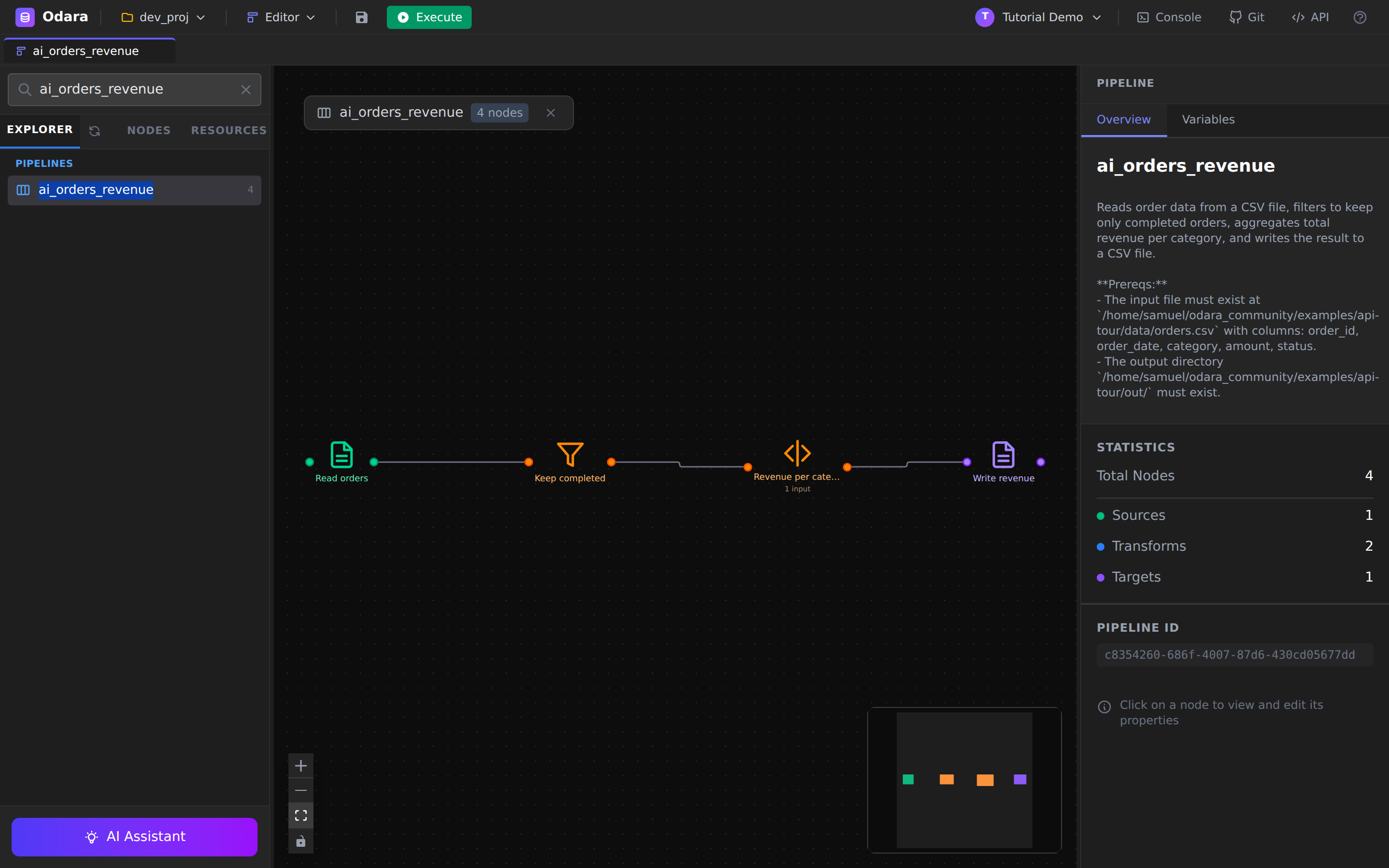
The run returns a per-node result. 800 orders in, filtered to completed, summed per category, written out — in tens of milliseconds:
category     order_count  revenue
Electronics  132          31295.41
Sports       129          14515.76
Home         138          9965.76
Toys         121          6329.80
Books        126          4090.73
Use case: your pipelines live in Git. Code review for data flows. The exact same definition deployed from dev to prod — reproducible every time.
2. Let the AI build it — from one sentence
Describe a goal and POST it to /api/v1/ai/plan. The AI returns an ordered,
typed plan, each step with a reason:
curl -s -X POST $BASE/api/v1/ai/plan \
  -H "Authorization: Bearer $TOKEN" -H 'Content-Type: application/json' \
  -d '{"goal":"Read orders.csv (order_id, order_date, category, amount, status), keep only completed orders, total revenue per category, write a CSV."}'
csv_source       Read orders            - local CSV on disk
filter           Keep completed         - single row-level predicate on status
sql_transform    Revenue per category   - simple GROUP BY SUM in SQL
csv_target       Write revenue CSV      - CSV destination
Notice it split the simple status='completed' predicate into its own Filter
node and reserved SQL for the real aggregation. Nothing is on the canvas
yet — this is a proposal you approve.
Then /api/v1/ai/compose expands the approved plan into real nodes and edges.
The full goal → plan → compose → create → run is one script
(scripts/ai_compose_run.py):
1) PLAN     csv_source → filter → sql_transform → csv_target
2) COMPOSE  4 nodes, 3 edges
3) CREATE   pipeline id: c8354260-…
4) RUN
   ▸ Read orders            800 rows
   ▸ Revenue per category     5 rows
   success: True in 54 ms
A sentence became a working, running pipeline — the same one pictured above.
Use case: this is how an agent, or your own product, builds ETL on the fly. Odara is the engine behind the prompt.
You can also generate just the SQL or Python for a single transform with
POST /api/v1/ai/generate({"mode":"create","language":"sql","prompt":"…"}).
3. Run headless — and watch (SSE)
Running headless doesn't mean running blind. GET /run-stream is a
Server-Sent Events endpoint — one event per node, live:
curl -sN $BASE/api/v1/pipelines/$PID/run-stream \
  -H "Authorization: Bearer $TOKEN" -H 'Accept: text/event-stream'
> orders_revenue  (4 nodes)
    ok orders_csv             800 rows  16ms
    ok revenue_by_category      5 rows  16ms
    ... settle
    ok settle                   5 rows  3001ms
  done: 5 rows, 3058ms
You get pipeline_started, node_started, node_completed (with row counts and
durations), and pipeline_completed. This is what you wire into a scheduler,
a cron job, or your own progress dashboard. Need to stop a run? POST /api/v1/pipelines/:id/abort.
4. Discover a file's schema before you build
How do you build a pipeline for data you've never seen? Ask. POST /api/v1/files/infer-schema reads a file and returns typed columns with samples:
curl -s -X POST $BASE/api/v1/files/infer-schema \
  -H "Authorization: Bearer $TOKEN" -H 'Content-Type: application/json' \
  -d '{"path":"/…/orders.csv","file_type":"csv"}'
order_id     integer  e.g. 1001
order_date   date     e.g. 2026-03-18
amount       float    e.g. 66.64
status       string   e.g. completed
For databases it's the same idea: POST /api/v1/metadata/test-connection to
check reachability, and /api/v1/metadata/introspect-schema to list tables and
columns. Feed the result straight into the pipeline you generate.
5. Orchestrate with Maestro
One pipeline is rarely the whole job. Maestro is Odara's orchestrator, and it's API-driven too. Create a maestro that wraps pipelines in a parallel group and run it:
# steps: a parallel_group containing pipeline_call steps
MID=$(curl -s -X POST $BASE/api/v1/maestros \
  -H "Authorization: Bearer $TOKEN" -H 'Content-Type: application/json' \
  -d @maestro.json | python3 -c "import sys,json;print(json.load(sys.stdin)['id'])")

curl -s -X POST $BASE/api/v1/maestros/$MID/run -H "Authorization: Bearer $TOKEN"
# -> { "success": true, "total_pipelines": 2, "completed_pipelines": 2, … }
Series, parallel, conditional branches, retries — your whole multi-stage workflow, defined and triggered over HTTP. This is your nightly load, as code.
The same calls, from your stack
It's plain HTTP, so any language works. Node, with fetch:
const res = await fetch(`${BASE}/api/v1/pipelines/${id}/run`, {
  method: "POST",
  headers: { Authorization: `Bearer ${token}` },
});
const result = await res.json();   // { success, node_results, total_duration_ms }
TypeScript is identical — just add types. Python is in the repo
(scripts/ai_compose_run.py).
Cheat sheet
| I want to… | Call |
|---|---|
| Get a token | POST /api/v1/auth/login → access_token |
| Create a pipeline | POST /api/v1/pipelines (body: {name, nodes, edges}) |
| Run it | POST /api/v1/pipelines/:id/run |
| Watch it live | GET /api/v1/pipelines/:id/run-stream (SSE) |
| Stop a run | POST /api/v1/pipelines/:id/abort |
| Preview one node | POST /api/v1/preview |
| Plan from a goal | POST /api/v1/ai/plan |
| Compose the pipeline | POST /api/v1/ai/compose |
| Generate SQL/Python | POST /api/v1/ai/generate |
| Infer a file's schema | POST /api/v1/files/infer-schema |
| Test a DB connection | POST /api/v1/metadata/test-connection |
| Introspect DB tables | POST /api/v1/metadata/introspect-schema |
| Orchestrate pipelines | POST /api/v1/maestros + /maestros/:id/run |
What you learned
- A pipeline is JSON — create it, version it, deploy it identically across environments.
- The AI plans and composes a full pipeline from a sentence, over the API — the same engine your own app or agent can call.
- Runs are headless and observable: stream per-node progress with SSE, abort on demand.
- Schema discovery and Maestro orchestration are API-first too.
- Whatever you build by API is a normal Odara pipeline — it shows up on the canvas, runs, and monitors like any other.