Environments and isolated runs.
Environments, the Base and the active environment in Odara ETL; choosing where each run happens: Local, Docker, AWS ECS Fargate or Google Cloud Run.
15. Environments & Isolated Runs
15.1 Environments and where runs happen
Two different things:
- An environment (DEV, STG, PROD, or any you create) says which values a run uses: database hosts, passwords, keys.
- Its Execution setting says where its runs happen: Local, Docker, AWS ECS Fargate or Google Cloud Run. A cloud is never an environment; it is a setting of one.
A pipeline does not choose where it runs: it runs in an environment, and that environment's Execution setting decides. The same pipeline can run locally while you build it (DEV), in a container in staging (STG) and on AWS in production (PROD), with no change — exactly like variables, which already differ per environment.
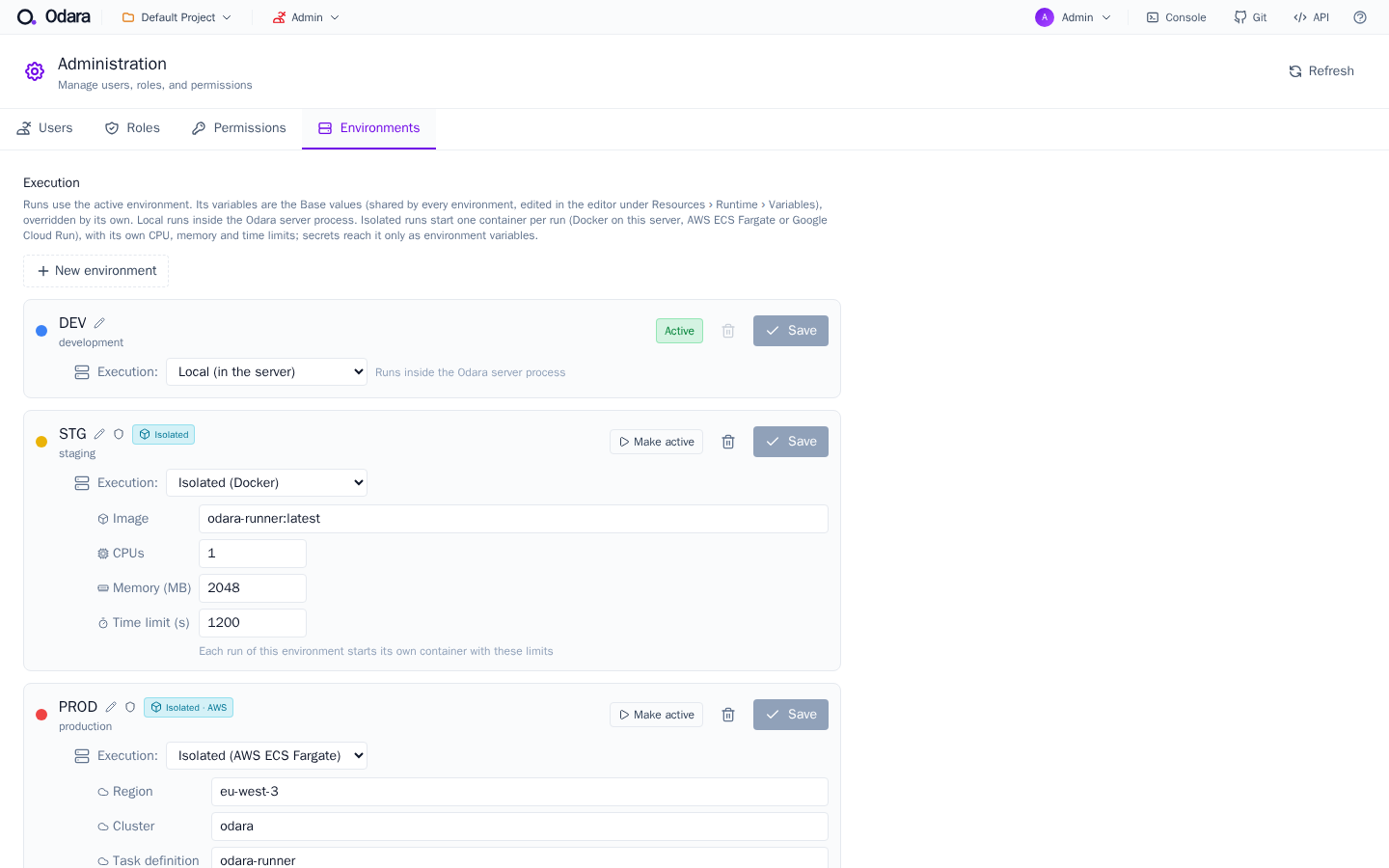
Set it in Admin › Environments, per environment:
| Execution | What happens |
|---|---|
| Local (in the server) | The default. The run happens inside the Odara server process, as always. |
| Isolated (Docker) | One container per run on the Odara server, with its own CPU, memory and time limits, removed at the end. Needs Docker on the server and the Odara runner image. |
| Isolated (AWS ECS Fargate) | One Fargate task per run in your AWS account, with the CPU and memory size you pick and a time limit. Deleted at the end. |
| Isolated (Google Cloud Run) | One execution of a Cloud Run job per run in your Google Cloud project, with a time limit. vCPU and memory are fixed by the job. |
Every way of starting a run follows the setting: the editor's Execute button, the API, the scheduler and Maestro.
15.2 Base and the active environment
Base is not a place where pipelines run. It holds the variable values shared by every environment. Each environment only defines what differs, and its own value wins over the Base:
BASE:  DB_USER = odara    DB_PORT = 5432      ← defined once
  ├── DEV:   DB_HOST = dev-db
  ├── STG:   DB_HOST = stg-db
  └── PROD:  DB_HOST = prod-db

A run in PROD uses [ Base values ] + [ PROD values ] (PROD wins on a clash)- The Base can't be the active environment, and it isn't listed in Admin › Environments; edit its values in the editor under Resources › Runtime › Variables.
- Make active: in Admin › Environments the active environment shows Active; the others have a Make active button. The active environment is used by runs that don't choose one.
- New environment: a name and a colour. It runs Local until you choose otherwise.
- Rename (pencil): changes the name you see. The id used by variables never changes, so renaming breaks nothing.
- Delete (bin): not the Base and not the active environment. Its variables are deleted with it; pipelines are not touched.
15.3 Choosing the environment of a run
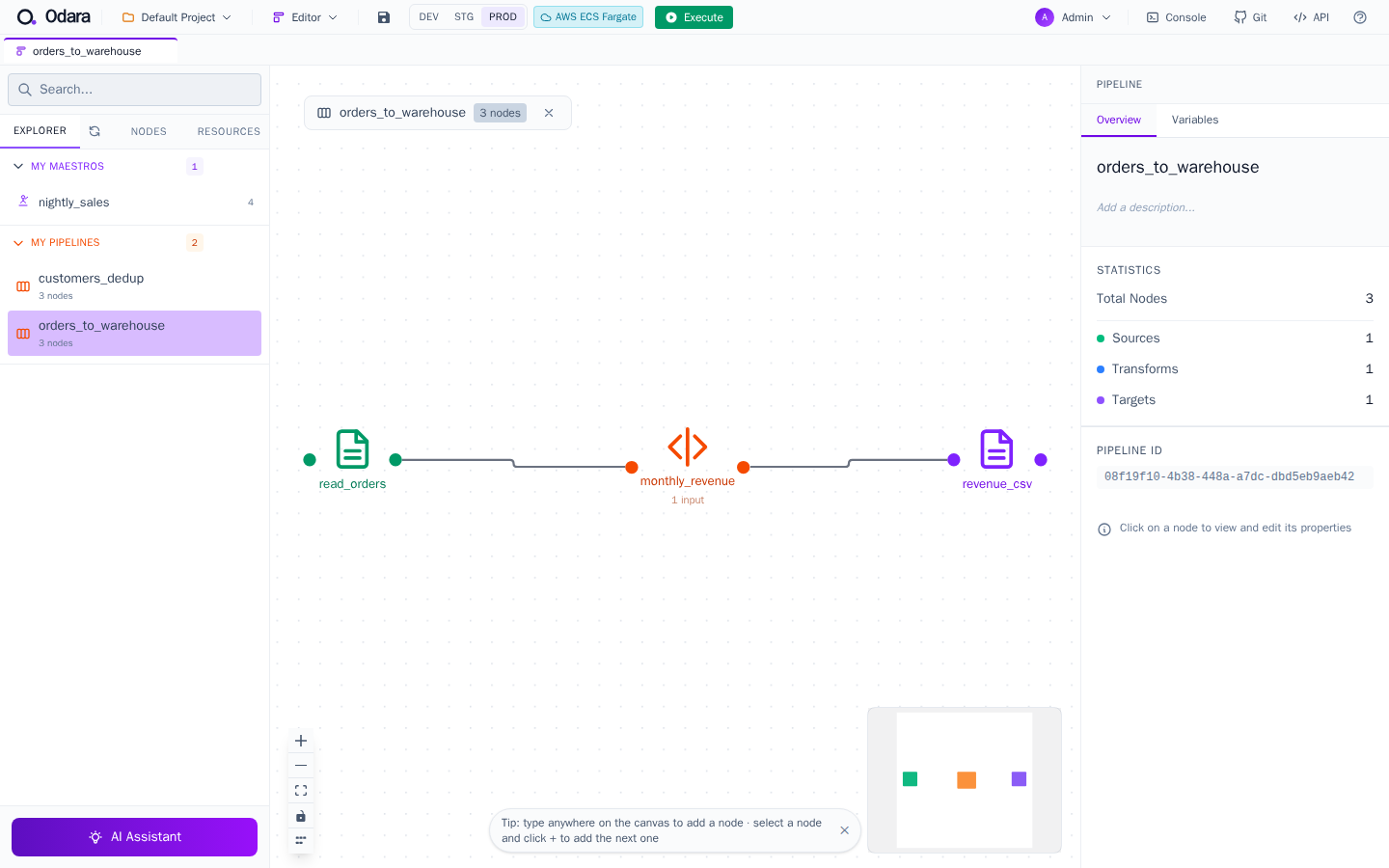
- Editor: the top bar shows the environments and, next to Execute, a badge saying where the chosen one runs. The choice belongs to that pipeline's tab: one tab can run in DEV while another runs in PROD. It applies to Execute and Preview (a preview always runs in the server, with that environment's values) and does not change the server's active environment.
- API:
POST /api/v1/pipelines/:id/runtakes{"environment": "production"};GET /run-streamand the Maestro run endpoints take?environment=(13.3). - Schedules: each schedule can name its environment (7.8).
- Maestro: every child pipeline of a Maestro run, parallel ones included, runs in the Maestro run's environment.
- Monitor: each run shows
Environment: <name>.
15.4 Isolated runs
An isolated run does not happen inside the Odara server process. Odara starts a fresh, throw-away runner for that one run, sends it the pipeline, follows its progress, and removes it at the end. Why you would use it:
- Limits per run: each run has its own CPU, memory and time limit. A runaway Python step hits its own memory limit and is stopped; it doesn't slow down or crash the server or other runs.
- Elasticity: on AWS or Google Cloud, ten runs at once get ten machines; you pay for the minutes they run, and nothing stays switched on between runs.
- Separation: a run only sees what its bundle carries.
The life of a run on AWS (Google Cloud is the same, with Secret Manager, Cloud Run and Cloud Logging):
- You press Execute (or a schedule, the API or a Maestro starts the run).
- The server builds the run bundle: the pipeline and its variables, without the secret values.
- It puts the secrets in a vault entry for this run only (AWS Secrets Manager / Google Secret Manager).
- It asks for a machine (ECS Fargate task / Cloud Run job execution), which starts from the Odara runner image.
- The runner reads the bundle and its own secrets, runs the pipeline against your data, and writes its progress to the cloud's logs.
- The server reads that progress and shows it in the editor and the Monitor.
- At the end the vault entry is deleted and the machine has stopped — whether the run succeeded, failed or was stopped.
Abort and the time limit stop the runner; running out of memory is reported as such in the Monitor. A Fargate task or a Cloud Run execution takes roughly 30–60 seconds to start, so isolated runs suit pipelines that take minutes, not seconds.
15.5 Files inside a run
An isolated run has no access to the server's disk. A pipeline that reads or writes a path on the server's disk is refused before launch, with the paths listed.
A run has its own /tmp, empty at the start and gone at the end. Use it for a file that one node writes or downloads and another node reads or uploads in the same run:
S3 Read  ──►  /tmp/in/sales.csv  ──►  CSV Source  ──►  SQL  ──►  database
(local path /tmp/in/ — end it with "/" to download into a folder)- A file written under
/tmpthat no later node uses is refused (it would be lost). - A path taken from a column must start under the run's
/tmpfolder, for example/tmp/batch/@{name}. - File sources and targets (CSV, Excel, XML, Magic File) only open local files. A path such as
s3://…,https://…orsftp://…in one of them is refused with the node to use instead (S3, Azure Blob or FTP nodes) — before launch in an isolated run, when the node runs in a local run. - Google nodes (BigQuery, Google Drive) need their service-account key as a secret variable holding the key JSON, not a key file on the server (4.3.3, 4.5).
15.6 Secrets and permissions
- Secrets travel apart from the bundle. The bundle never holds a secret value. On AWS and Google, the per-run vault entry can only be read by that run, and is deleted when the run ends. Secret values never appear in logs or in the Monitor.
- The server coordinates; the runner does the work. The server's cloud identity may only start, watch and stop its runs, read their logs, and create and delete the per-run vault entries. It cannot read your data: the pipeline carries its own credentials (an S3 key, a database password) as secret variables, as in a local run.
- Treat the server's cloud key like a password: while a run is going on, its holder could start a runner with their own command and read the secrets of runs in progress.
15.7 Network
The AWS setup creates a network for the runs with no inbound access; each run leaves through its own public IP, a different one for every run. That decides how a run reaches a database:
| Where the database is | How | Approx. cost |
|---|---|---|
| In the same cloud, in the runs' network | Allow its port from the runs' security group; traffic stays inside the network. | nothing extra |
| Elsewhere, reachable from the internet, firewall by IP | A NAT gateway with a fixed IP (on Google: Direct VPC egress plus Cloud NAT), which the database's firewall allows. | ~US$ 35/month, always on |
| Elsewhere, private (a company network) | A site-to-site VPN between the cloud network and that network. | ~US$ 36/month + the other side |
A database that only listens on 127.0.0.1 of another server is never reachable from a run.
15.8 Costs
You pay your cloud provider for the minutes a runner exists, and for what is stored. For example, an AWS Fargate task of 1 vCPU and 2 GB costs about US$ 0.06 per hour — about US$ 0.001 per minute — plus a small public-IP charge while it runs (approximate, Paris region). Nothing stays switched on between runs, unless you add a NAT gateway or a VPN.
| Workload | Usually cheaper on |
|---|---|
| Occasional runs, or bursts of many runs at once | Fargate / Cloud Run: pay per minute, one machine per run |
| Heavy and constant, around the clock | Your own server, with environments running Local or Docker |
Because Execution is per environment, you can mix: daily runs on your server, the month-end batch in the cloud. Set a budget alert in your cloud account before the first run.
15.9 Setting it up
- Docker: Docker on the Odara server and the Odara runner image; then Admin › Environments › Execution › Isolated (Docker), with the image name, CPUs, memory and time limit.
- AWS: a CloudFormation template creates everything the runs need (cluster, task definition, logs, network, least-privilege roles and the server's IAM user) and prints the values to paste in Admin › Environments › Execution › Isolated (AWS ECS Fargate). The server's access key goes on the Odara server (environment variables or
~/.aws/credentials), never in a chat or an e-mail. - Google Cloud: a setup script (run in Cloud Shell) creates the Cloud Run job, its service accounts and the bundle bucket, and prints the values for Admin › Environments › Execution › Isolated (Google Cloud Run), plus the server's key file to place on the Odara server.
Ask the Odara team ([email protected]) for the runner image, the AWS template and the Google Cloud setup script.