Isolated runs on Docker
One line: set an environment's Execution to Isolated (Docker) and every run in that environment gets its own throw-away container on the Odara server, with its own CPU, memory and time limit.
Until now every pipeline ran inside the Odara server process. That is fine while you build, but one heavy Python step can eat the server's memory and slow everyone else down. An isolated run happens somewhere else: Odara starts a fresh machine for that one run, sends it the pipeline, follows its progress and deletes the machine at the end. The pipeline itself does not change at all.
Docker is the simplest place to start: everything stays on your server. The same idea works on AWS and Google Cloud, in the AWS ECS Fargate and Google Cloud Run walkthroughs.
You will:
- Get the
odara-runnerimage onto the server - Let Odara use Docker
- Set the STG environment to Isolated (Docker)
- Run a pipeline in STG from the editor
- Read the run in the Monitor
It takes about 15 minutes. Every screen below comes from a real Odara 0.4.1 with the runner image 0.4.1.
Before you start
- Odara 0.4.1 or later, signed in with an admin account (Admin › Environments is only shown to admins).
- Docker Engine on the Odara server (
docker versionworks). - A pipeline to run. The screens use
customers_by_region: it downloads a CSV from S3 into the run's/tmp, counts customers per region with SQL, writes the result as CSV and uploads it back to S3.
1. Get the runner image
The runner is the program that executes one pipeline run inside the
container. It ships as a Docker image, odara-runner, with one tag per Odara
release. Use the tag of your Odara version: a 0.4.4 server needs
odara-runner:0.4.4.
You can get it in three ways. All three are the runner of the same release, built by the same script; pick whichever your server can reach.
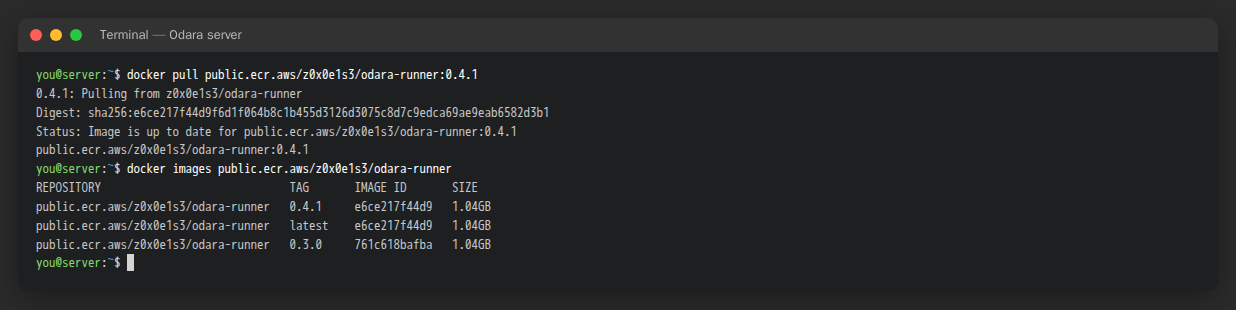
a) Amazon ECR Public (no account needed):
docker pull public.ecr.aws/z0x0e1s3/odara-runner:0.4.4
b) Google Artifact Registry (public):
docker pull europe-west9-docker.pkg.dev/odara-test-514914/odara/odara-runner:0.4.4
c) A download from Odara's release server, for servers that can't reach a registry. Download the tarball and its checksum, check it, then load it:
curl -fLO https://pub-8227a3dbc0c64f88b0bbc027d1108f55.r2.dev/runner/odara-runner_0.4.4.tar.gz
curl -fLO https://pub-8227a3dbc0c64f88b0bbc027d1108f55.r2.dev/runner/odara-runner_0.4.4.tar.gz.sha256
sha256sum -c odara-runner_0.4.4.tar.gz.sha256
docker load -i odara-runner_0.4.4.tar.gz        # → odara-runner:0.4.4
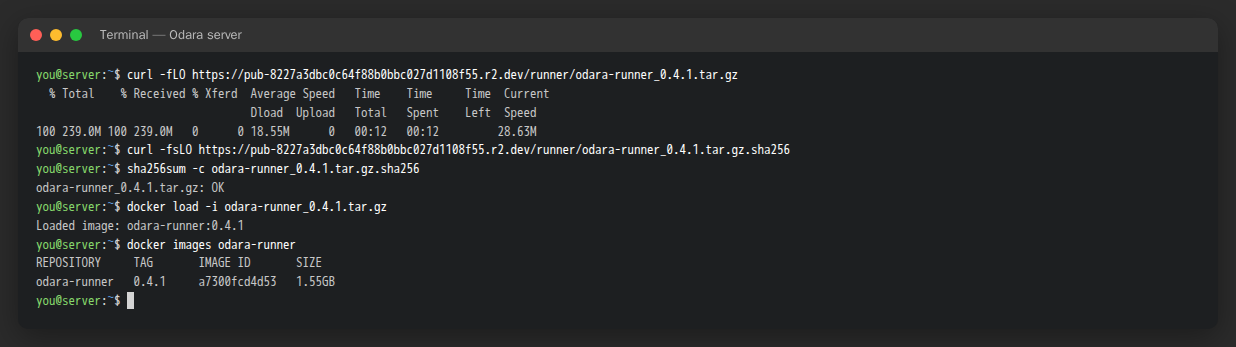
With this option the image is named odara-runner:0.4.4 (no registry in
front). Use that name in step 3.
2. Let Odara use Docker
Odara starts each run with the docker command, as the user that runs
Odara. That user must be allowed to use Docker.
If you installed the .deb or .rpm package (the odara systemd service),
run:
sudo usermod -aG docker odara
sudo systemctl restart odara
Odara 0.4.1 and earlier only: those versions wrote each run's bundle
under /tmp, and the packaged service has a private /tmp that Docker cannot
see, so the container found an empty folder instead of the bundle ("cannot
read bundle /run/odara/bundle.json: Is a directory"). On those versions, also
run sudo systemctl edit odara and paste:
[Service]
PrivateTmp=no
ReadWritePaths=/tmp
then sudo systemctl restart odara. From 0.4.2 on this is not needed:
the bundle is written under Odara's own data folder
(/var/lib/odara/.odara/runs for the package, ~/.odara/runs otherwise, or
ODARA_RUN_DIR), in a folder only Odara can open, and removed when the run
ends. Remove the drop-in after upgrading (sudo systemctl revert odara).
What the bundle is: for each run Odara writes a small file with the pipeline and its non-secret variables, and mounts it, read-only, into the container. Secret values never go in it.
If you run Odara another way (the Linux tarball's start.sh, a shell),
make sure that user is in the docker group and that's all.
Optional: the network of the run containers
By default each container joins Docker's default bridge network: it can
reach the internet and anything the server can reach by IP, but not
127.0.0.1 of the server (inside a container, that is the container
itself). To put the run containers on a network of your own, for example the
one where your database container lives, set ODARA_DOCKER_NETWORK in Odara's
environment:
[Service]
Environment="ODARA_DOCKER_NETWORK=odara-runs"
The containers then reach the other containers of that network by name
(postgres:5432).
3. Set STG to Isolated (Docker)
Open Admin (the view menu at the top left) › Environments.
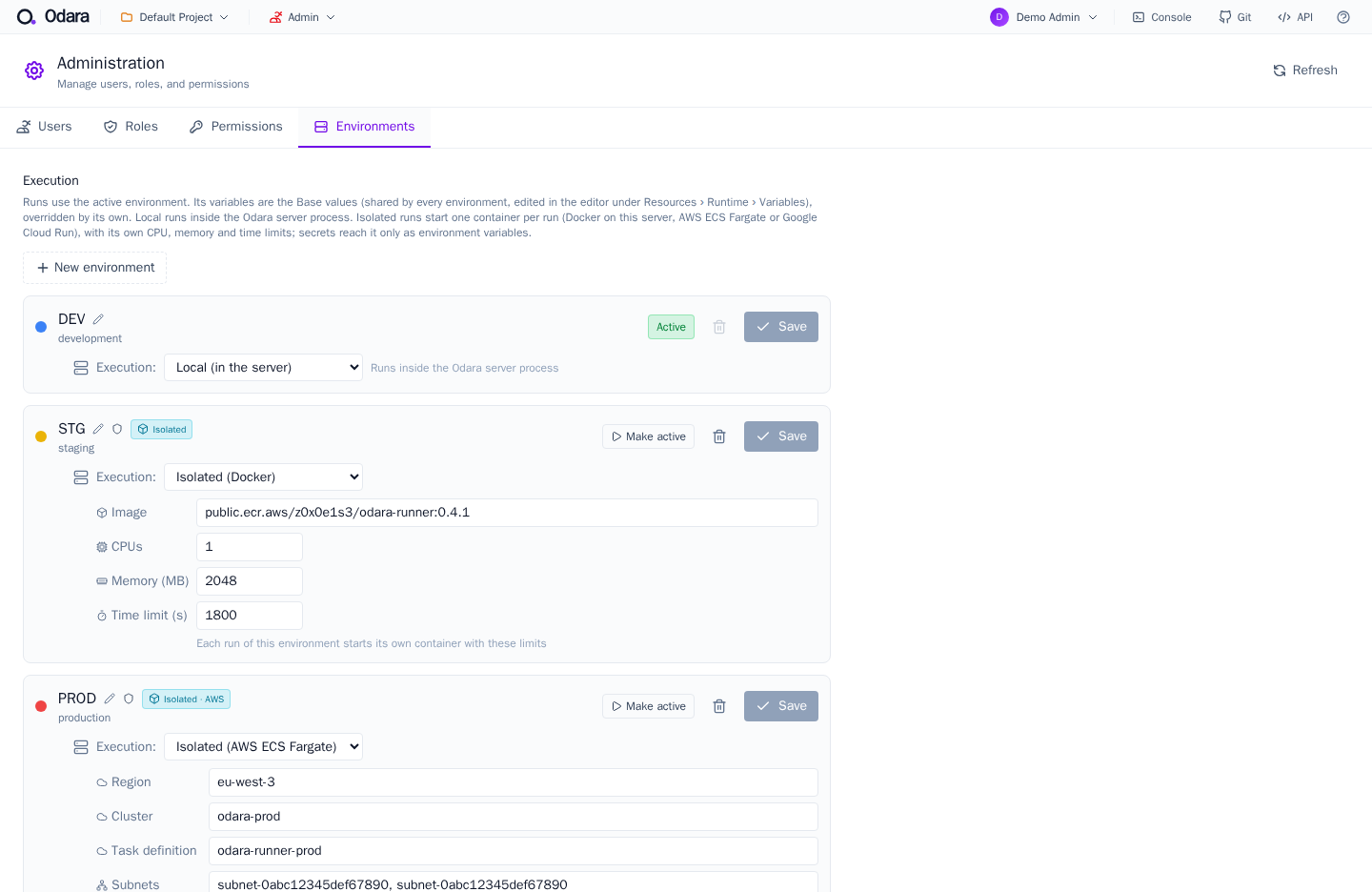
Each environment has an Execution setting:
- DEV stays on Local (in the server) — the default: runs happen inside the Odara server, as always.
- For STG, choose Isolated (Docker) and fill in:
| Field | Value | What it does |
|---|---|---|
| Image | public.ecr.aws/z0x0e1s3/odara-runner:0.4.4 (or odara-runner:0.4.4 if you loaded the tarball) |
The runner image, with your Odara version's tag |
| CPUs | 1 |
CPU limit of each run's container |
| Memory (MB) | 2048 |
Memory limit. A run that needs more is stopped and reported as out of memory |
| Time limit (s) | 1800 |
A run still going after 30 minutes is stopped |
Click Save. The environment now carries an Isolated badge.
An environment says which values a run uses (hosts, passwords) and, through Execution, where it runs. The cloud or the container is never an environment of its own: it is a setting of one. See Environment per run and per schedule.
4. Run the pipeline in STG
Open the pipeline in the Editor. The top bar lists the environments (DEV, STG, PROD, …). Click STG: the badge next to Execute now says Docker.
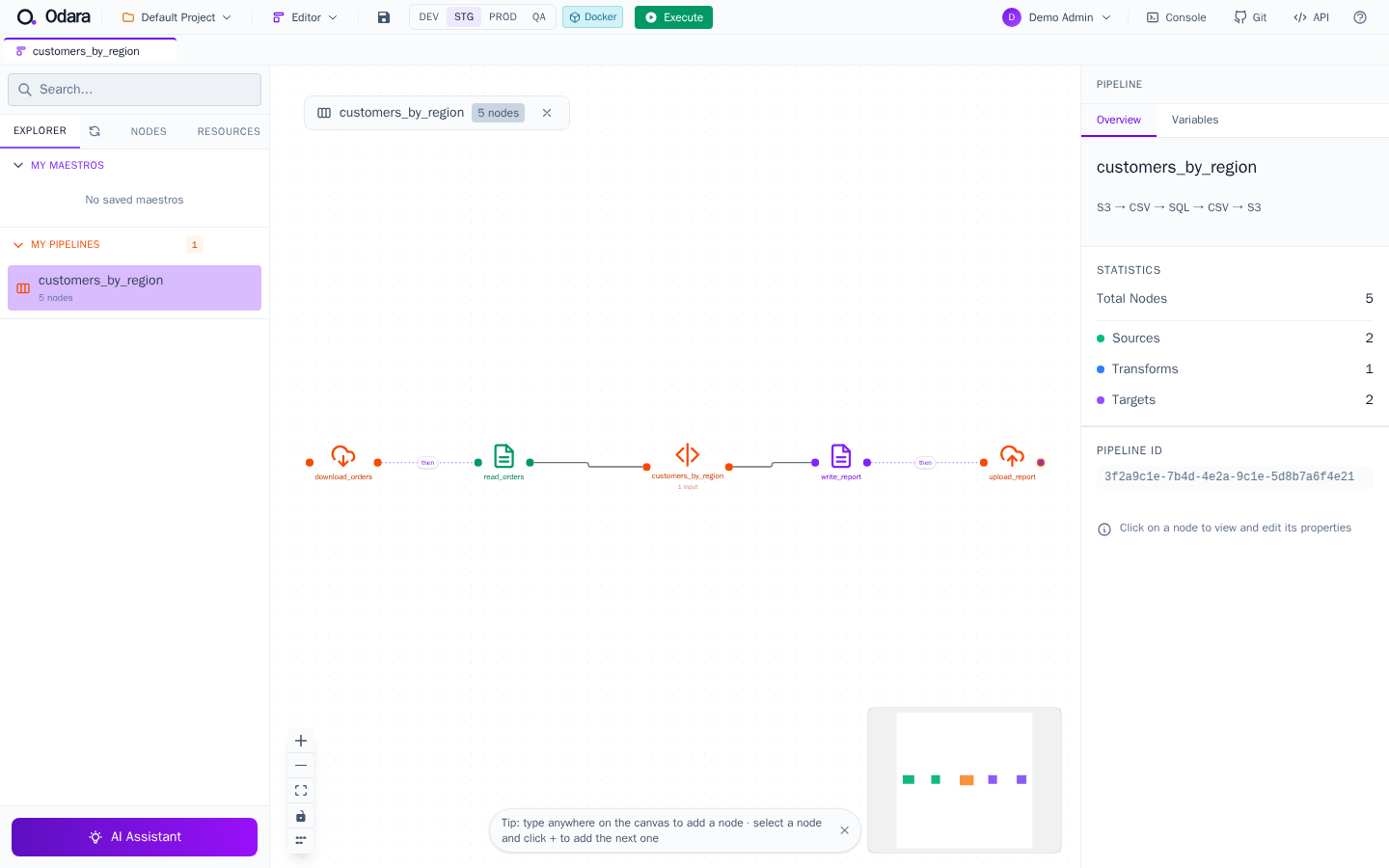
This choice belongs to this pipeline's tab only. It does not change the server's active environment, other tabs or any schedule.
Click Execute. The nodes light up one after the other as the container reports its progress, and the run ends with Completed in ….
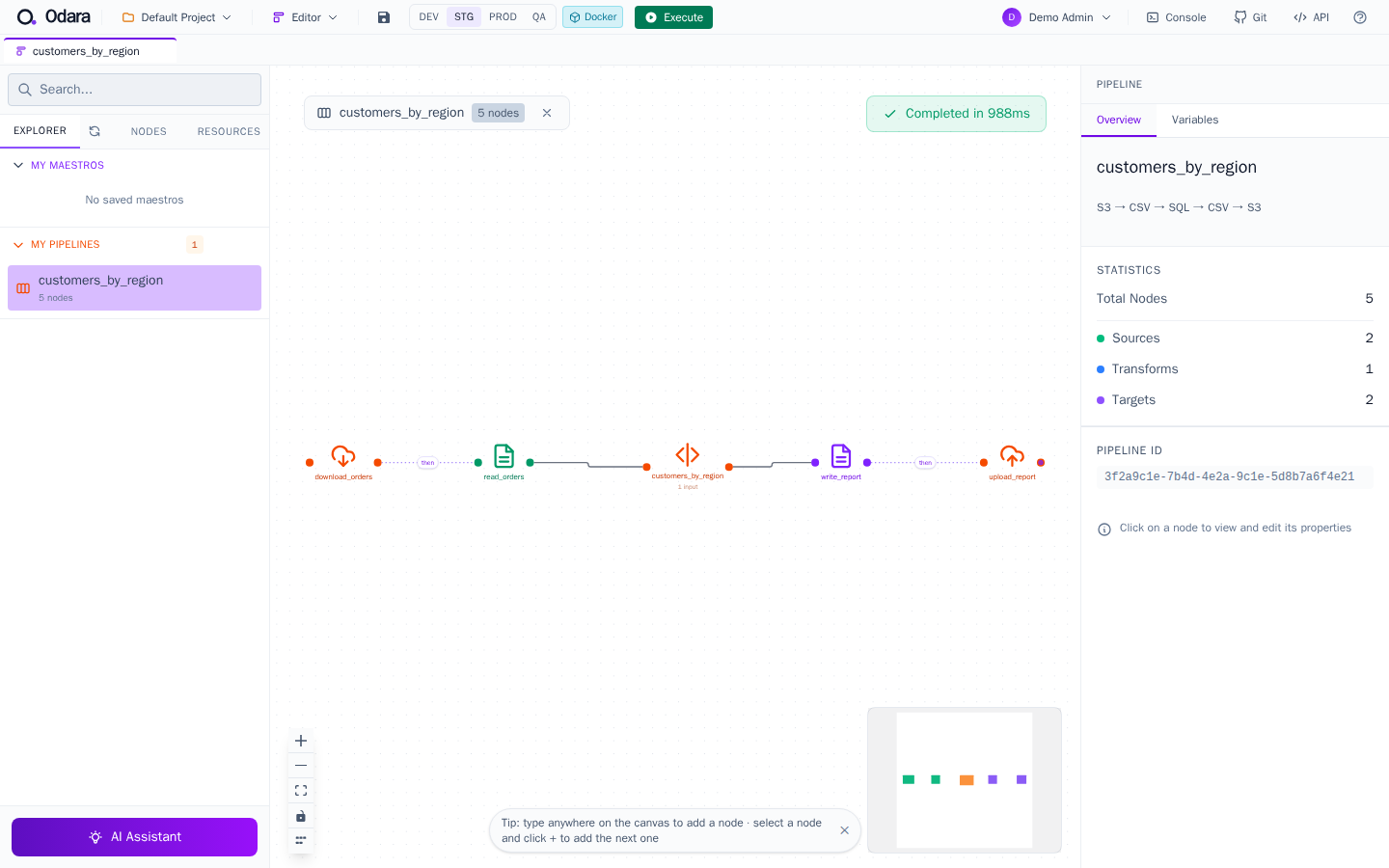
The container is deleted as soon as the run ends: docker ps -a shows
nothing left behind.
5. Read the run in the Monitor
Open Monitor and click the run.
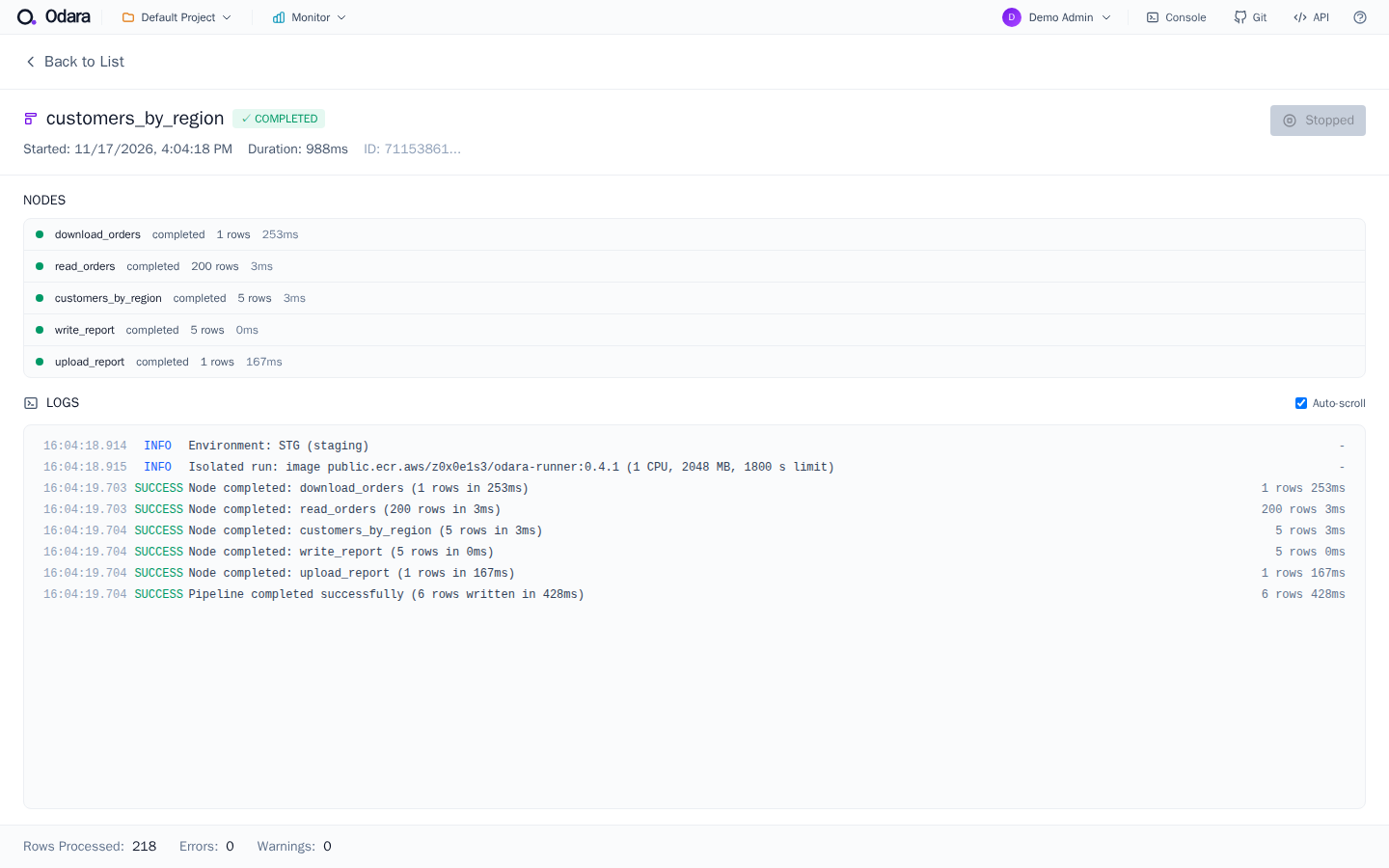
The first two log lines tell you where it ran:
Environment: STG (staging)
Isolated run: image public.ecr.aws/z0x0e1s3/odara-runner:0.4.1 (1 CPU, 2048 MB, 1800 s limit)
Everything else is recorded as for a local run: each node's rows and time, the log lines, the target history.
What an isolated run can and can't see
- No access to the server's disk. A pipeline that reads or writes a path on the server is refused before the run starts, with the paths listed.
- Its own
/tmp, empty at the start and gone at the end. Use it to pass a file from one node to the next in the same run: S3 Download into/tmp/in/(end a folder with/), then a CSV Source on/tmp/in/clientes.csv. - Secrets reach the container as environment variables, never inside the bundle file.
- Databases must be reachable from the container: a database that only
listens on
127.0.0.1of the server is not.
Troubleshooting
| You see | Do this |
|---|---|
permission denied while trying to connect to the Docker daemon socket |
The Odara user is not in the docker group (step 2), or the service wasn't restarted. |
Unable to find image / pull errors |
Check the image name and tag in step 3; on an offline server use option (c) and the name odara-runner:0.4.4. |
| The run fails at once reading its bundle | The packaged service still has a private /tmp: add the drop-in of step 2 and restart. |
| out of memory | Raise Memory (MB) for the environment, or make the step lighter. |
Next
- Environment per run and per schedule: run the same pipeline in DEV, STG and PROD, and pin a schedule to one.
- Isolated runs on AWS ECS Fargate and on Google Cloud Run: one cloud machine per run, nothing running in between.