Isolated runs on Google Cloud Run
One line: one script in Cloud Shell prepares your Google Cloud project; then every run of an Odara environment set to Isolated (Google Cloud Run) is one execution of a Cloud Run job, on a machine that exists only for that run.
This is the Google Cloud twin of the AWS ECS Fargate walkthrough: the Odara server stays where it is and coordinates; each run gets its own machine; nothing runs (or costs) between runs.
   ODARA SERVER (anywhere)                       GOOGLE CLOUD (your project)
 ┌──────────────────────────────┐
 │ Execute (QA)                 │
 │ 1. builds the run bundle,    │
 │    without secret values     │
 │ 2. secrets → a vault entry ──┼──►  Secret Manager  "odara-run-<id>"
 │ 3. runs the job ─────────────┼──►  Cloud Run job "odara-runner"
 │                              │         │ one execution
 │                              │         ▼
 │                              │    ┌────────────────────────┐
 │                              │    │ THE RUN'S MACHINE      │──► BigQuery, S3, databases…
 │                              │    │ runs the pipeline,     │
 │                              │    │ writes its progress    │
 │                              │    └───────────┬────────────┘
 │ 4. reads the progress ◄──────┼──── Cloud Logging
 │ 5. deletes the vault entry ──┼──►  (execution finished)
 └──────────────────────────────┘
You will:
- Create a project and a budget alert
- Run
setup.shin Cloud Shell - Look at what it created
- Put the server's key on the Odara server
- Set an environment to Isolated (Google Cloud Run)
- Run, and follow the run in Odara and in Google Cloud
It takes about 25 minutes. Every screen is real: Odara 0.4.1, runner
0.4.1, region Paris (europe-west9). The project id is shown as
my-project-123456; project numbers, key ids and e-mails are masked.
Before you start
- A Google Cloud project with billing linked, where you are Owner.
Note its project id (under the name on the dashboard, for example
my-project-123456): it may differ from the name. - Odara 0.4.1 or later, admin account.
1. Set a budget alert
Open Billing › Budgets & alerts › Create budget. Pick the project, an amount (US$ 20 a month is plenty for tests) and alerts at 50 %, 90 % and 100 %.
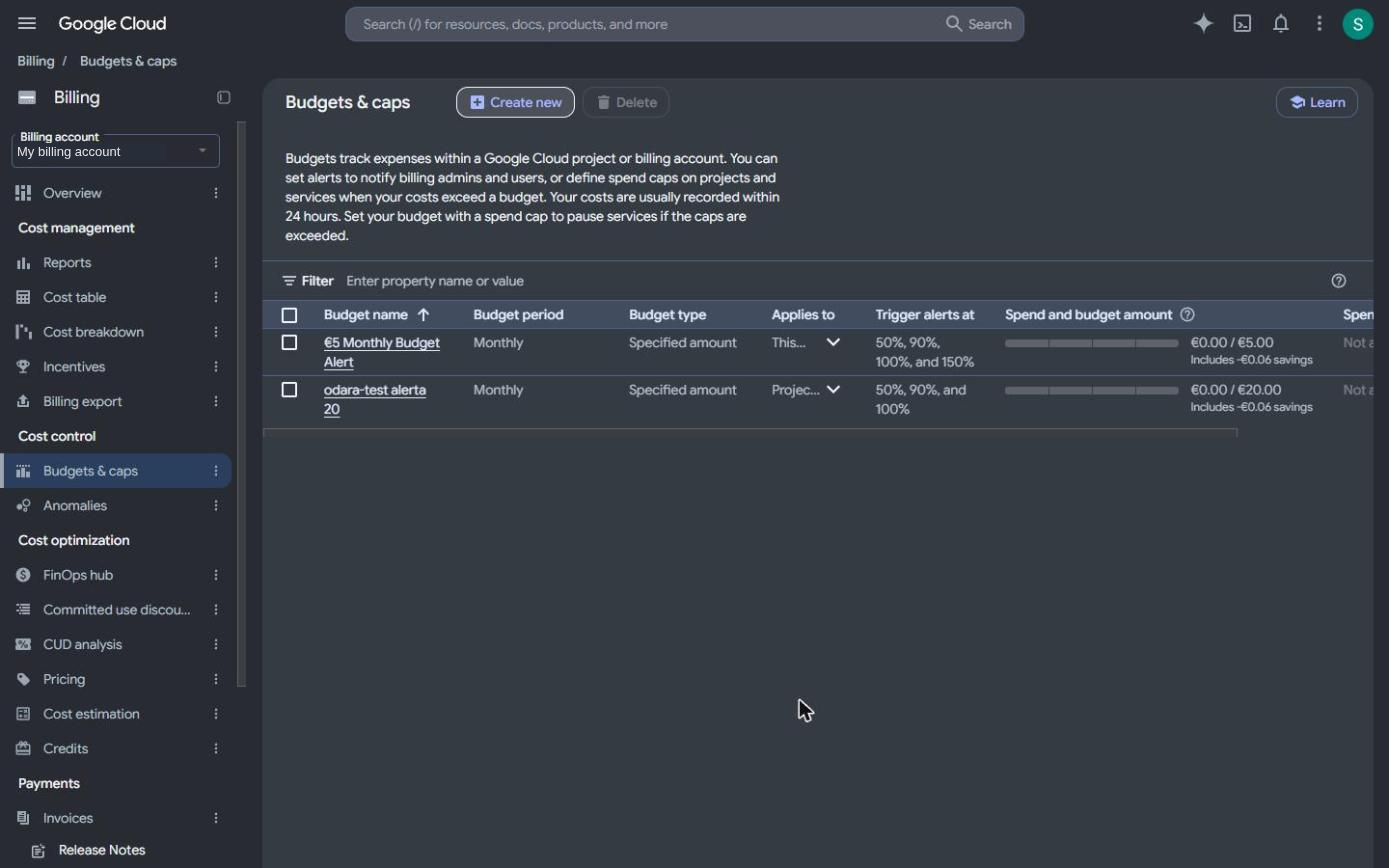
A Google budget warns, it doesn't block: it e-mails you, and spending goes on. A test month normally stays under US$ 2 (cost table at the end).
2. Run setup.sh in Cloud Shell
In the console, click Activate Cloud Shell (the >_ button at the top right). A terminal opens at the bottom of the page, already signed in as you. Download the script and run it with your project id:
curl -fsSLO https://odara.rs/deploy/gcp/setup.sh
PROJECT=my-project-123456 bash setup.sh
Releases from 0.4.2 on also ship the script in the package, under
deploy/gcp/ (/usr/share/odara/deploy/gcp/ for the .deb and .rpm).
The script prints each command before running it, in six steps:
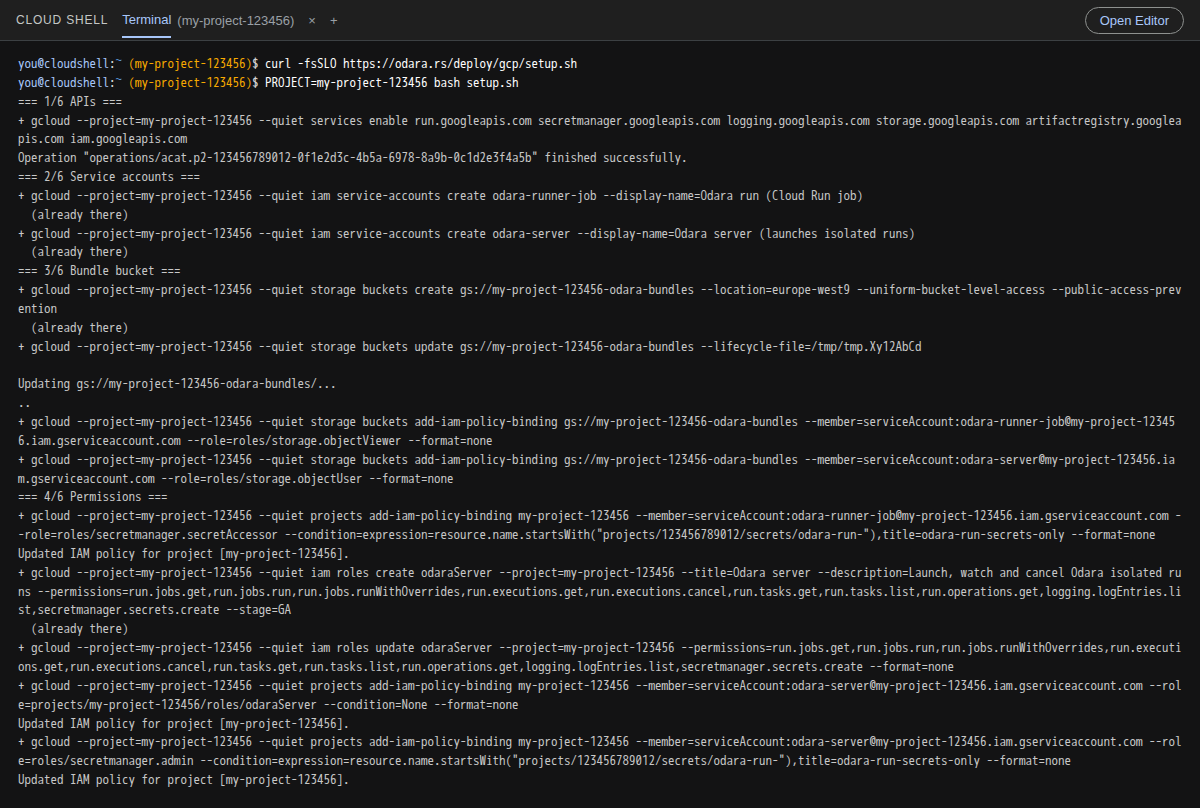
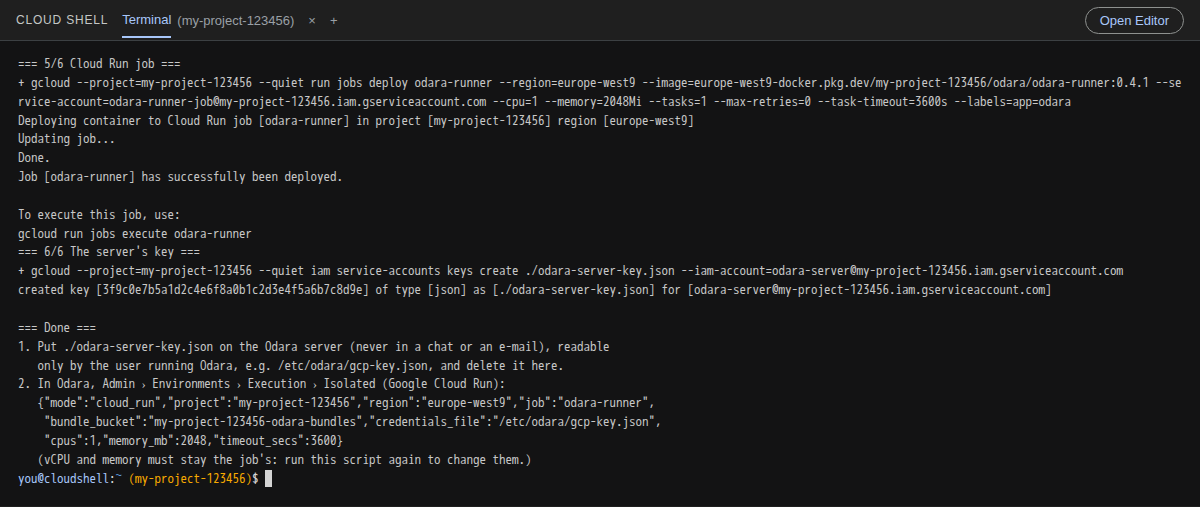
It takes about 3 minutes. What each step does:
| Step | What it creates |
|---|---|
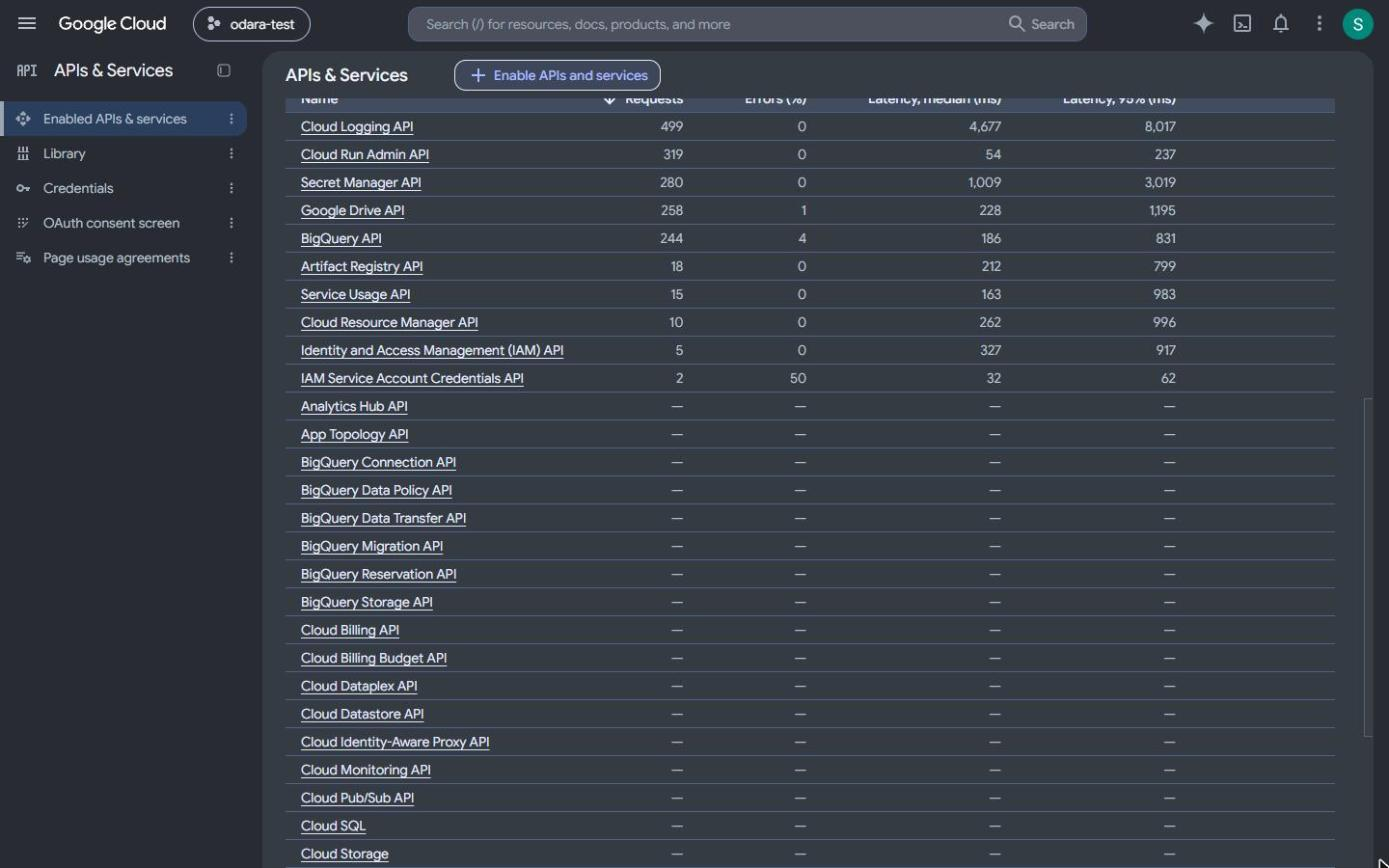
| 1/6 APIs | Enables Cloud Run, Secret Manager, Logging, Storage, Artifact Registry and IAM. |
| 2/6 Service accounts | odara-runner-job (the run's identity) and odara-server (the Odara server's identity). |
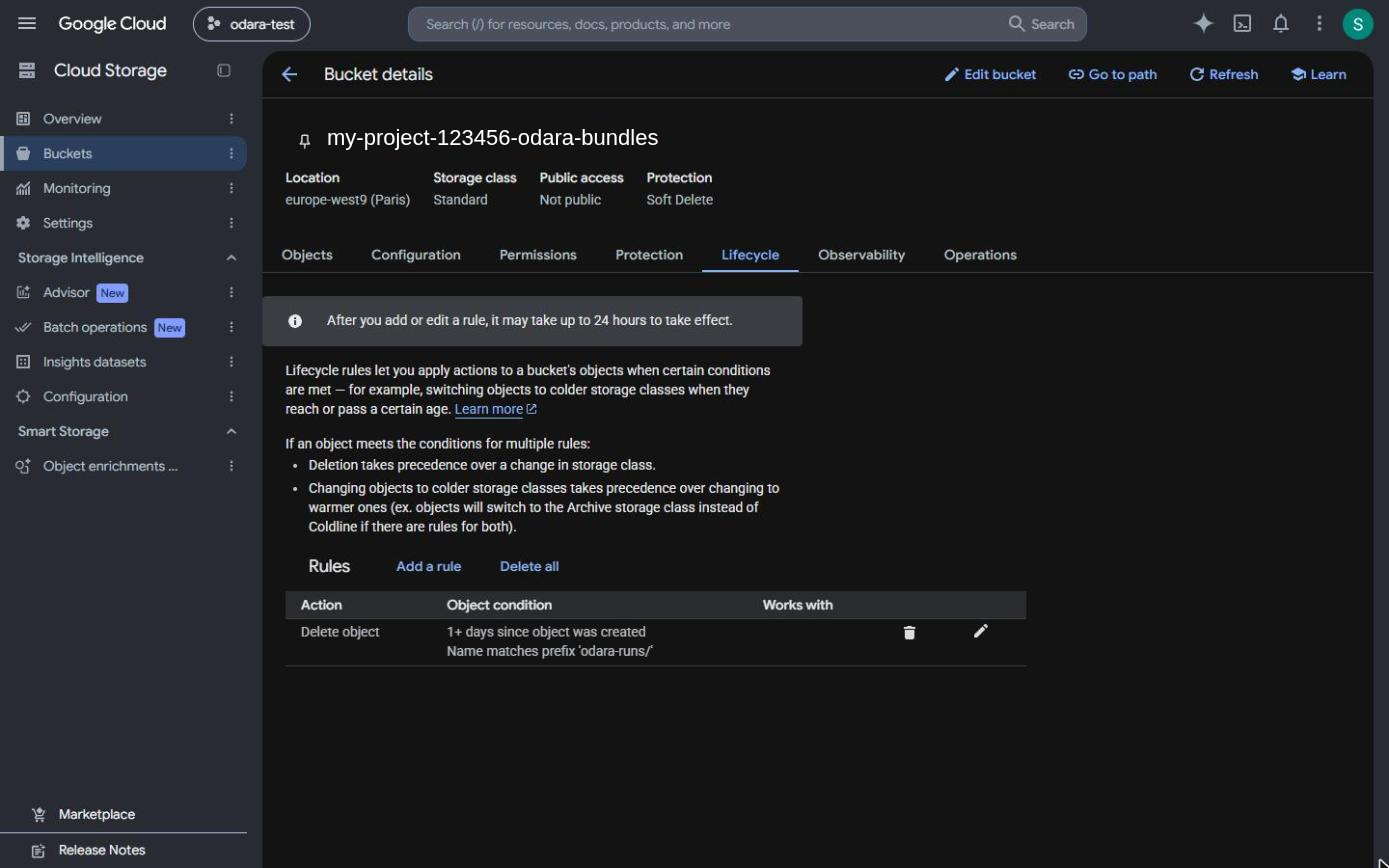
| 3/6 Bundle bucket | <project>-odara-bundles, private, files under odara-runs/ deleted after 1 day. |
| 4/6 Permissions | The run may only read its own secret (odara-run-*) and the bundles. The server may only run, watch and cancel this job, read the logs, create and delete the per-run secrets and write bundles (custom role odaraServer). |
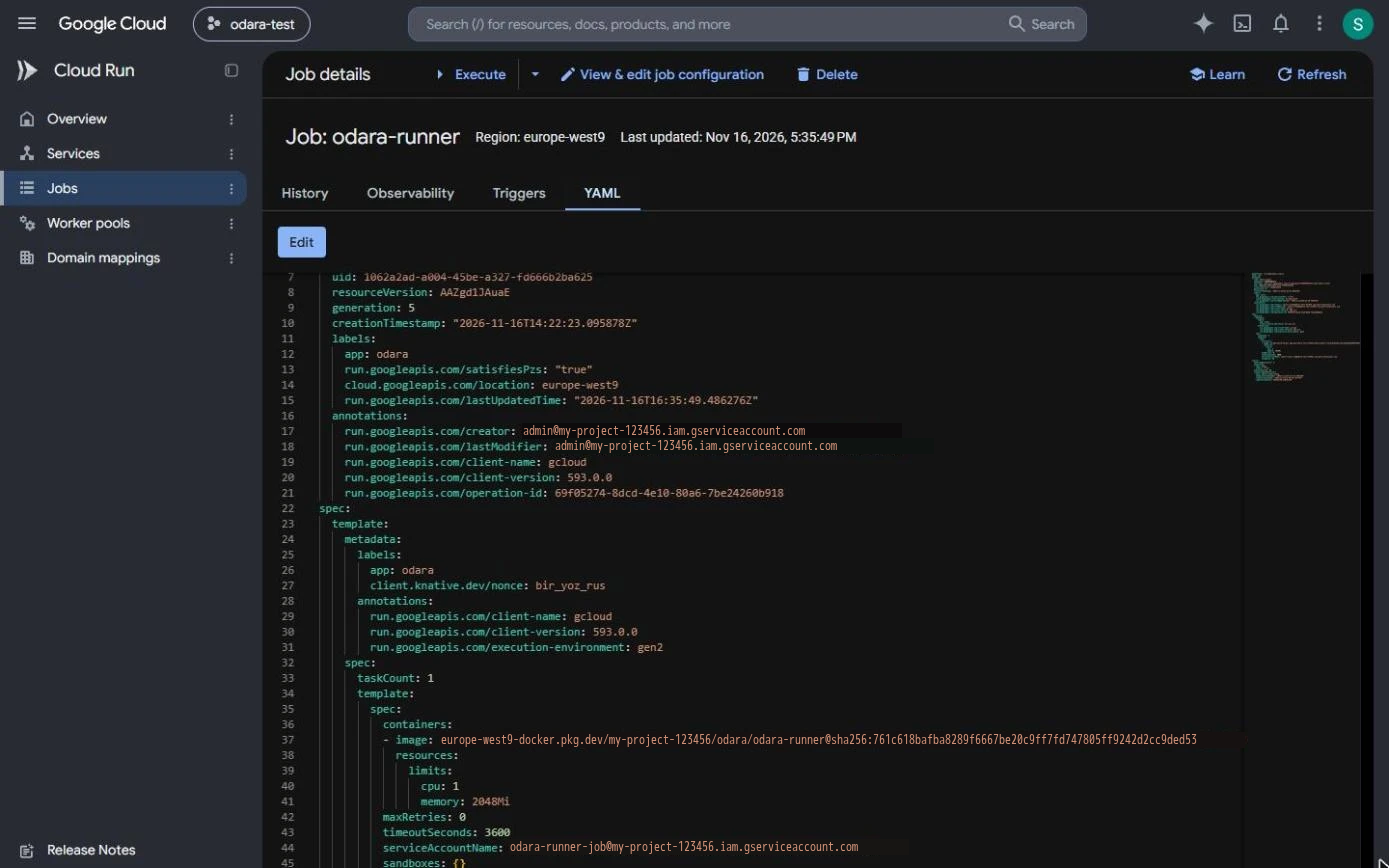
| 5/6 Cloud Run job | odara-runner: one task, no retries, 1 vCPU, 2048 MiB, 1 hour timeout, running as odara-runner-job. |
| 6/6 The server's key | odara-server-key.json, the key of odara-server. |
It ends with the setting to paste in Odara. Running it again updates what exists ("already there") and doesn't create a second key while the key file is still in the folder.
Options, set in front of the command like PROJECT:
| Variable | Default | Use |
|---|---|---|
REGION |
europe-west9 (Paris) |
Where the job runs |
CPUS, MEMORY_MB |
1, 2048 |
Size of every run's machine (see below) |
TIMEOUT_SECS |
3600 |
The job's maximum time |
IMAGE |
the public runner of this release | Use your Odara version's tag |
NETWORK, SUBNET |
— | Direct VPC egress (fixed outgoing IP, see Databases) |
DRY_RUN=1 |
— | Print the commands, change nothing |
CPU and memory belong to the job. Unlike Fargate, Cloud Run can't change the machine size per run. To change it, run the script again with, say,
CPUS=2 MEMORY_MB=4096, and put the same values in Odara.
3. What the script created
APIs & Services › Enabled APIs & services now lists the APIs of step 1:
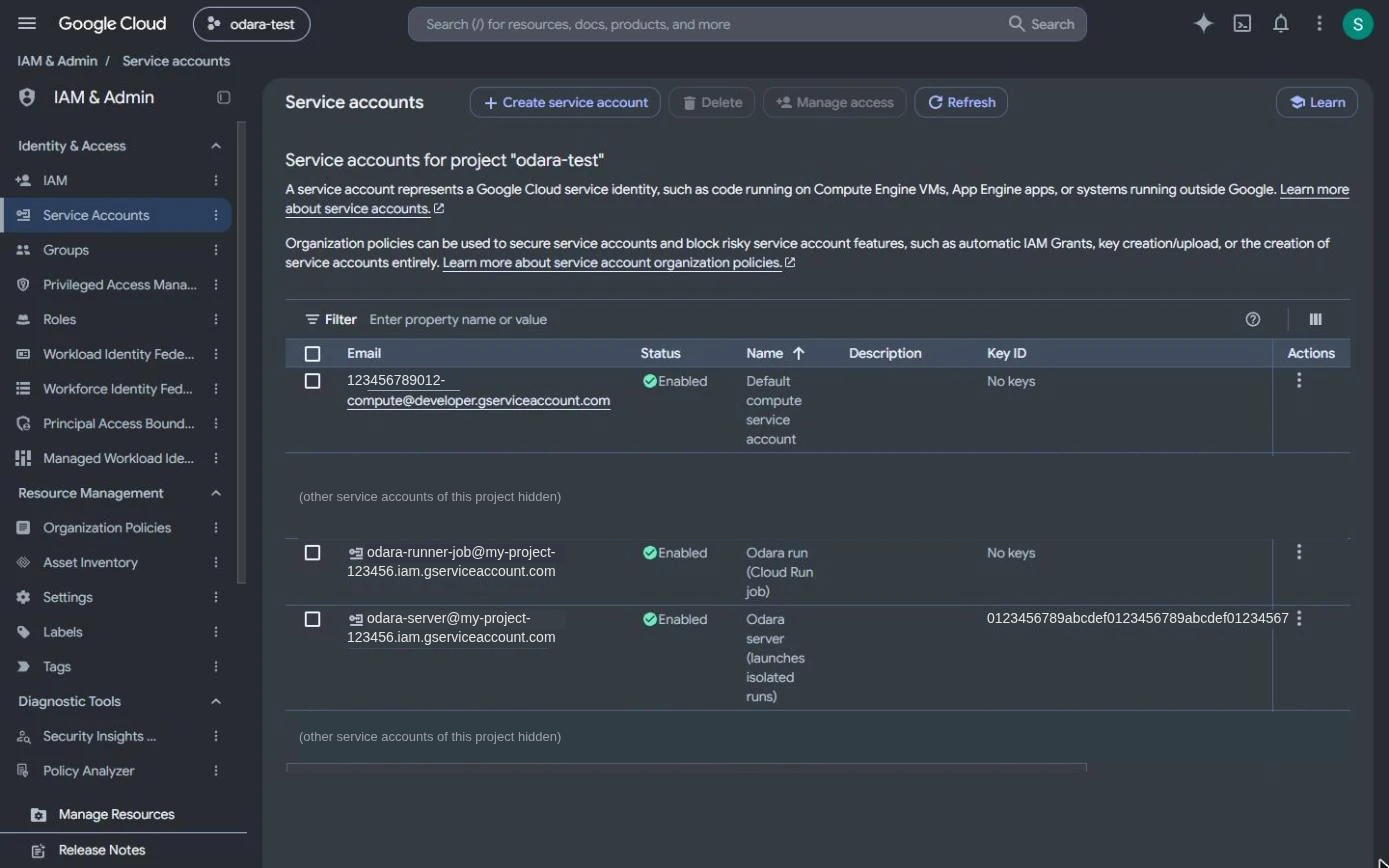
IAM & Admin › Service accounts shows the two accounts. odara-runner-job
has no key; odara-server has the one key the script created.
Cloud Storage › Buckets › <project>-odara-bundles › Lifecycle: the rule that deletes run bundles after a day.
Cloud Run › Jobs › odara-runner › YAML shows the job: the runner image,
cpu: 1, memory: 2048Mi, maxRetries: 0, timeoutSeconds: 3600, and
serviceAccountName: odara-runner-job@….
About the runner image
The job runs the public Odara runner image from Artifact Registry,
europe-west9-docker.pkg.dev/odara-test-514914/odara/odara-runner:<version>,
one tag per Odara release:
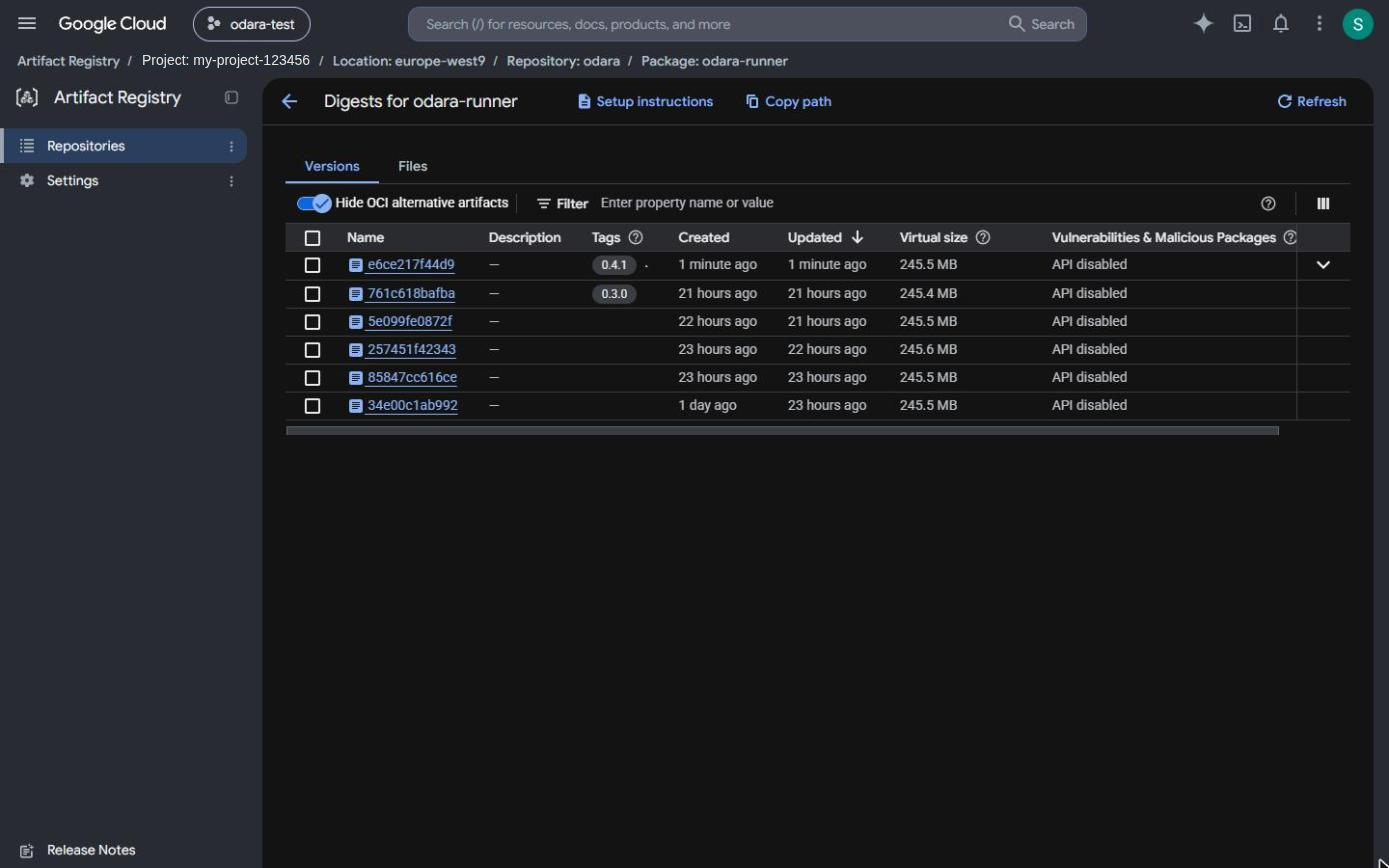
Use the tag of your Odara version (IMAGE=…:0.4.4). Cloud Run only runs
images from Google registries (it can't use the Amazon ECR copy). If your
organization only allows images from your own projects, copy it into an
Artifact Registry repository of yours and pass that address as IMAGE:
docker pull europe-west9-docker.pkg.dev/odara-test-514914/odara/odara-runner:0.4.4
docker tag europe-west9-docker.pkg.dev/odara-test-514914/odara/odara-runner:0.4.4 \
  europe-west9-docker.pkg.dev/my-project-123456/odara/odara-runner:0.4.4
docker push europe-west9-docker.pkg.dev/my-project-123456/odara/odara-runner:0.4.4
4. Put the server's key on the Odara server
The key file is in Cloud Shell's home folder. Download it with the Cloud
Shell menu (⋮ › Download, path odara-server-key.json), then put it on
the Odara server, readable only by the user that runs Odara:
sudo install -o odara -g odara -m 600 odara-server-key.json /etc/odara/gcp-key.json
Then delete it from Cloud Shell and from your computer:
rm odara-server-key.json # in Cloud Shell
Don't send the key by chat or e-mail. With the packaged service, keep it out
of /home and /root: the service can't read those folders.
"Key creation is disabled"? Your organization forbids service-account keys (policy
iam.disableServiceAccountKeyCreation). An administrator of the organization has to allow it for this project.
5. Set an environment to Isolated (Google Cloud Run)
In Odara, open Admin › Environments. The screens use a fourth environment, QA (New environment, name and colour). Set its Execution to Isolated (Google Cloud Run) and fill in the values the script printed:
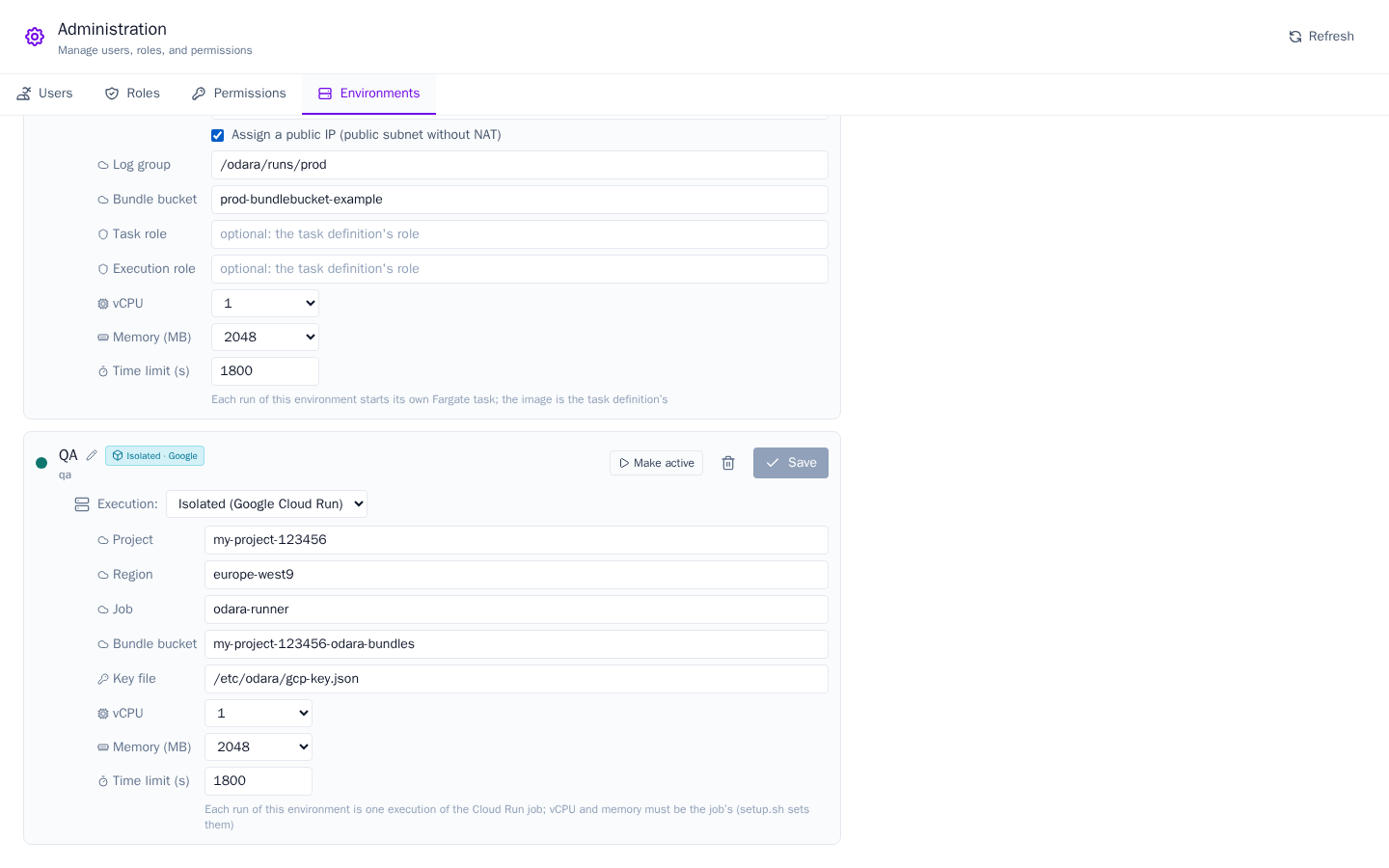
| Field | Value |
|---|---|
| Project | your project id |
| Region | europe-west9 |
| Job | odara-runner |
| Bundle bucket | <project>-odara-bundles |
| Key file | /etc/odara/gcp-key.json |
| vCPU / Memory (MB) | the job's: 1 / 2048 |
| Time limit (s) | up to the job's timeout |
Click Save.
6. Run, and follow the run
Open the pipeline in the Editor and click QA. The badge next to Execute says Google Cloud Run.
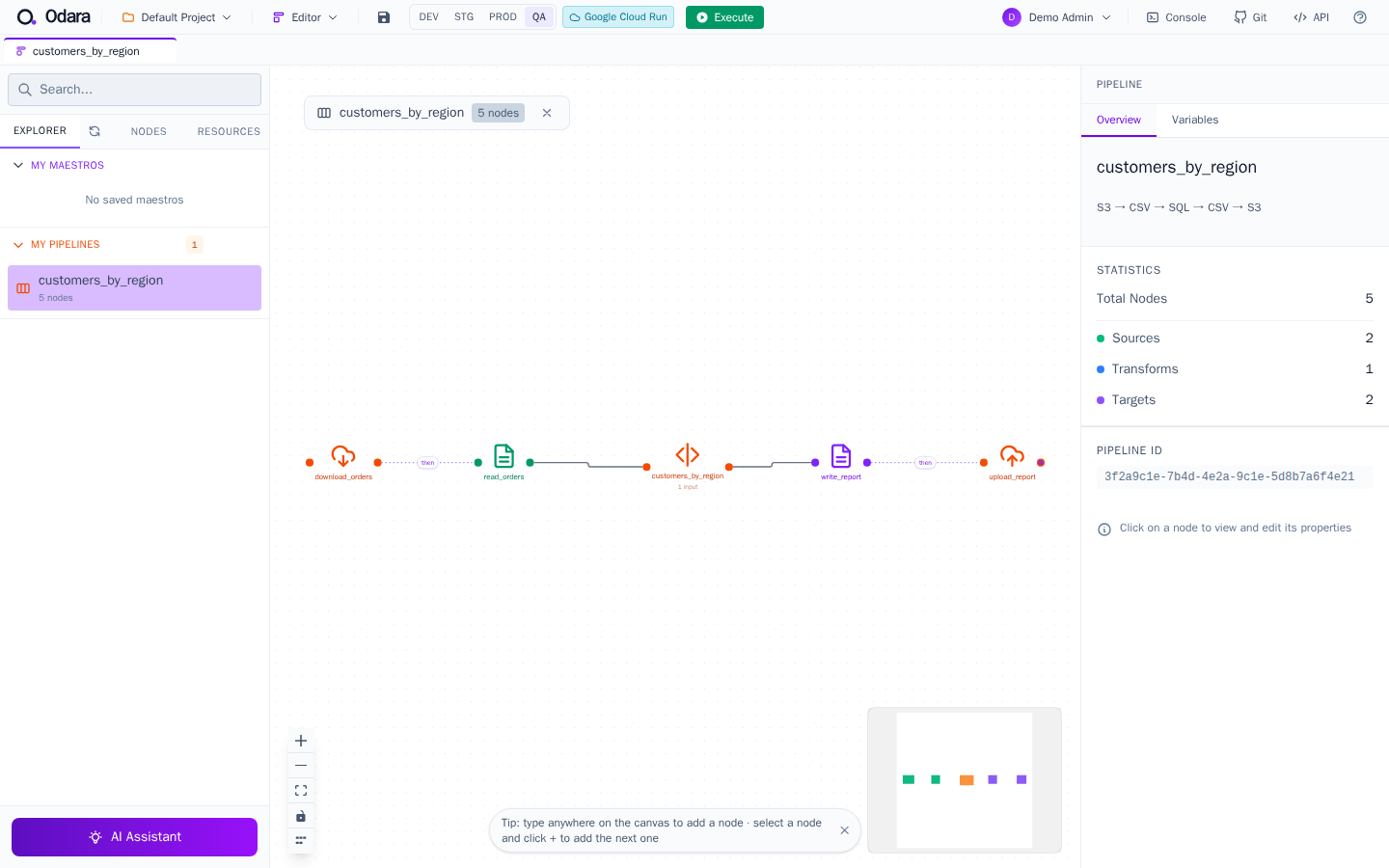
Click Execute. The first half-minute or so is Cloud Run starting the machine; then the nodes light up. In the Monitor, the run starts with:
Environment: QA (qa)
Isolated run on Google Cloud Run: job odara-runner in europe-west9 (my-project-123456) (1 vCPU, 2048 MB, 1800 s limit)
The same run, seen from Google Cloud
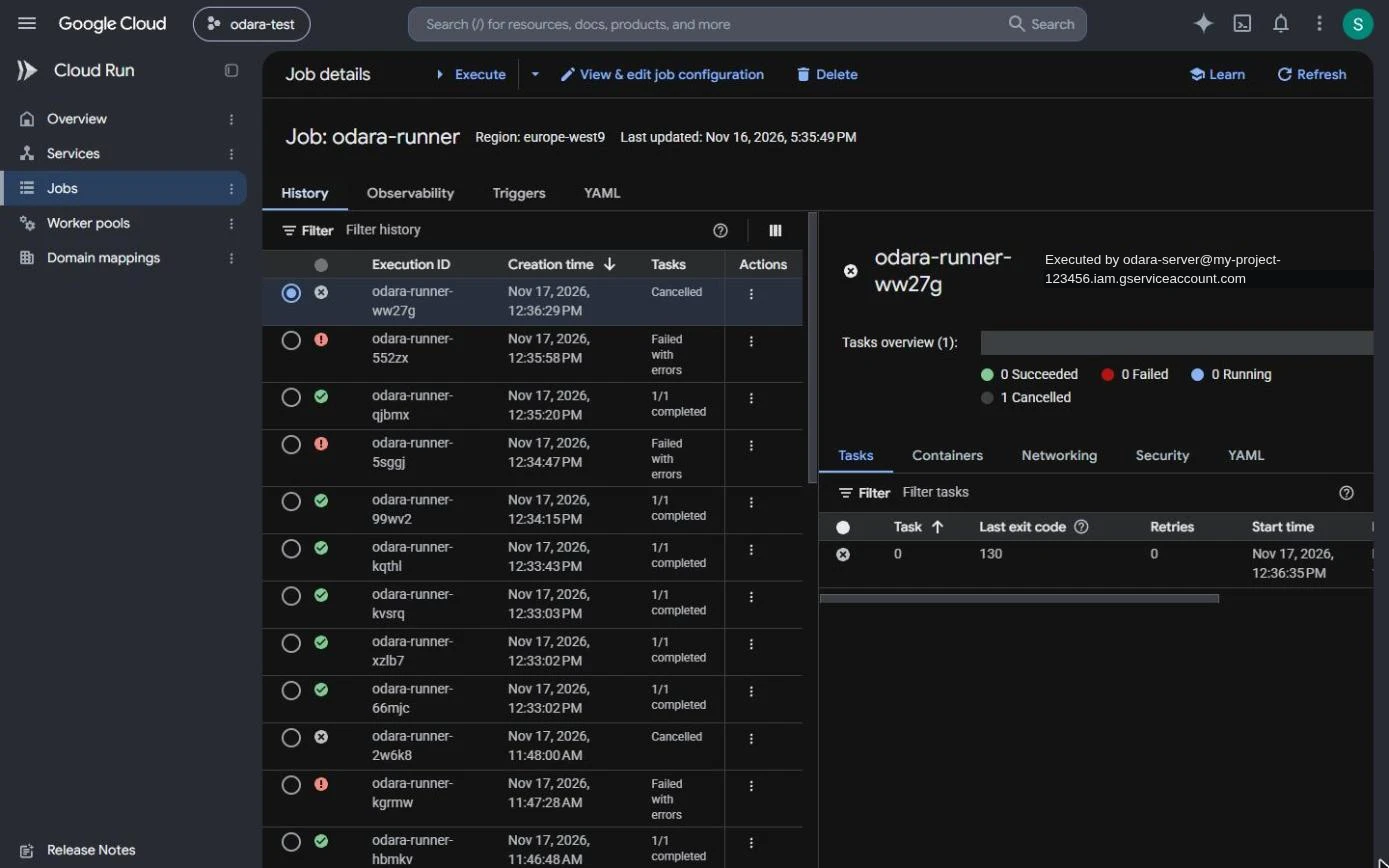
Cloud Run › Jobs › odara-runner › History: one execution per run.
Executed by is odara-server, the Odara server. A run stopped with
Abort in Odara shows as Cancelled, with exit code 130.
The same list from Cloud Shell:

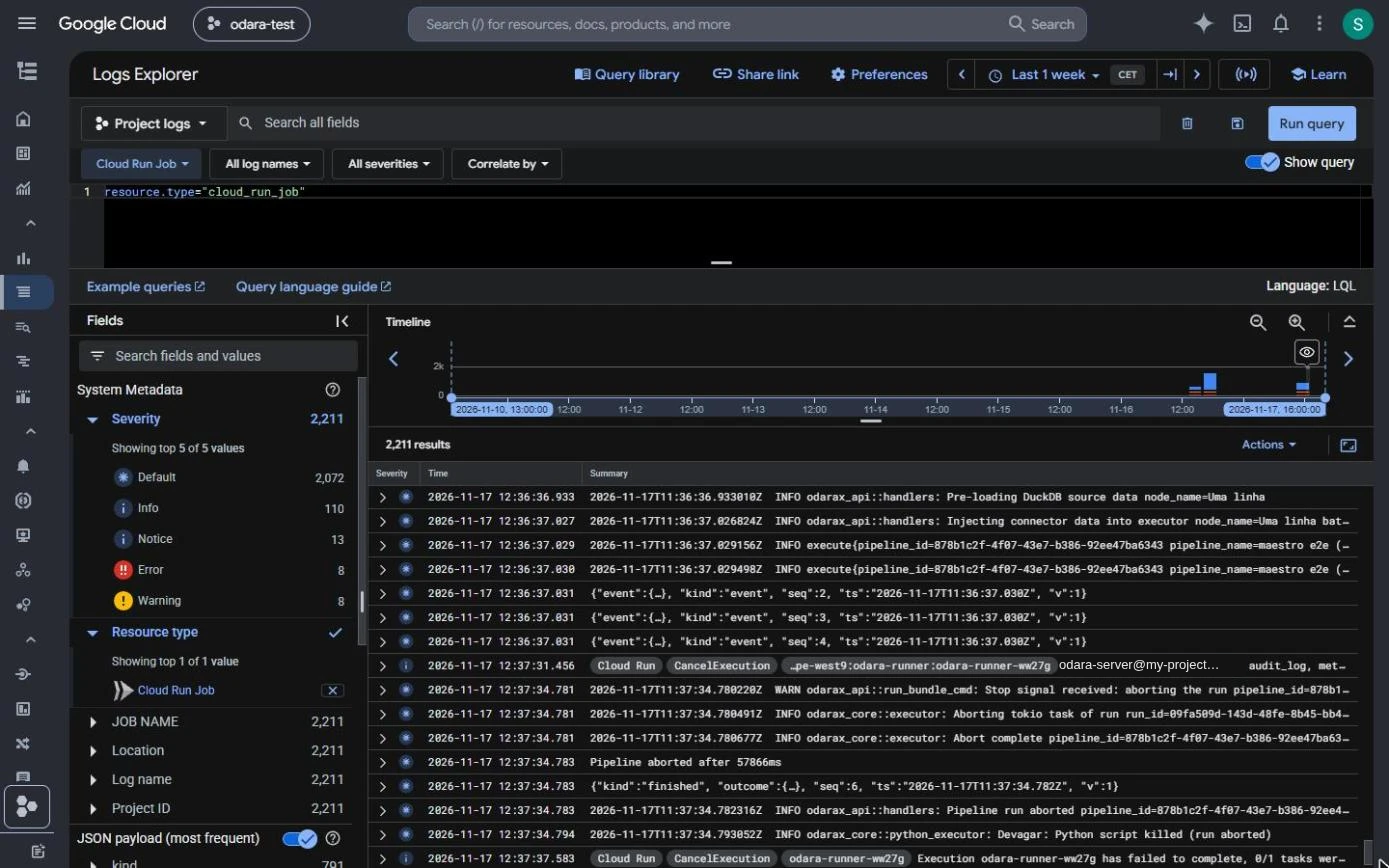
The run's own log lines are in Logging › Logs Explorer, query
resource.type="cloud_run_job". Odara reads its progress from there.
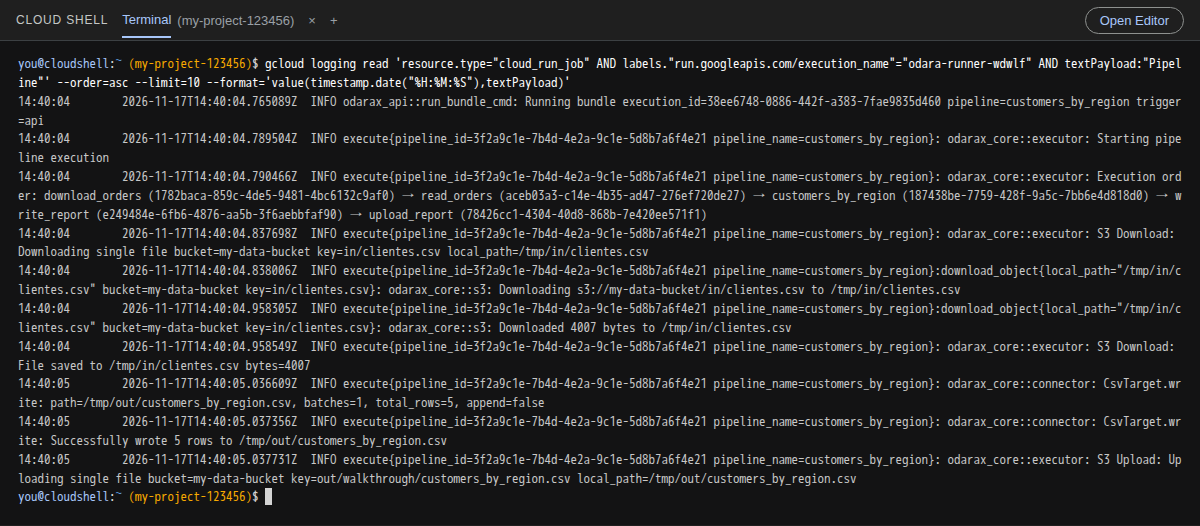
Or from Cloud Shell, for one execution:
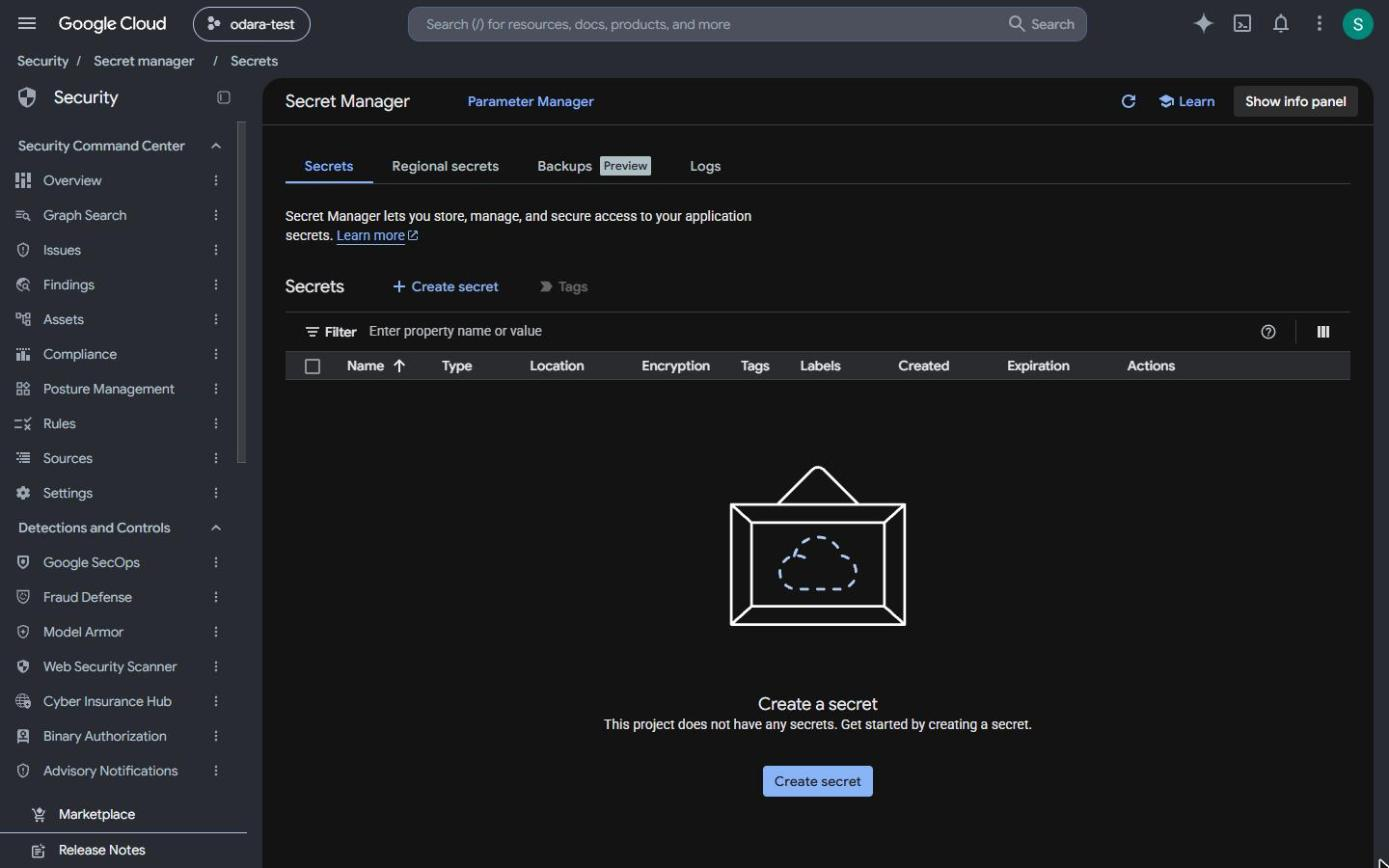
Security › Secret Manager is empty between runs: each run's secret is created at launch and deleted at the end, whether the run succeeded, failed or was cancelled.
Databases: how a run reaches them
By default a run leaves through the internet with a Google IP that changes every time. That suits databases open to the internet (with a password and TLS) and Google services (BigQuery, Cloud SQL with a public IP, Cloud Storage).
For a database whose firewall allows only known IPs, give the job a fixed
outgoing IP: create a VPC and a subnet in the same region, a Cloud Router
and a Cloud NAT with a reserved IP, then run the script again with
NETWORK=<vpc> SUBNET=<subnet>. The job then leaves through your VPC (Direct
VPC egress) and the NAT's one IP, which the database allows. About US$ 32 a
month for the NAT, plus US$ 0.045 per GB. A Cloud SQL instance in the same
project is then reached by private IP.
For Google nodes (BigQuery, Google Drive) inside a run, give the node its
key as a secret variable holding the key JSON (credentials_path = @{GCP_PIPELINE_KEY}): a run can't read a key file from the server's disk.
Delete everything
Simplest: IAM & Admin › Settings › Shut down shuts the whole project
down. Or one by one: the job (Cloud Run › Jobs), the bucket (Cloud
Storage), the two service accounts (IAM › Service accounts) and the
role odaraServer (IAM › Roles).
What it costs
Approximate, Paris, 1 vCPU / 2 GB. Cloud Run bills per second and has a monthly free tier (180,000 vCPU-seconds and 360,000 GB-seconds) that tests rarely exceed:
| Item | Price | 100 runs of 5 minutes |
|---|---|---|
| Cloud Run jobs | ≈ US$ 0.08 per hour of run | ≈ US$ 0.65, usually within the free tier |
| Per-run secrets | US$ 0.06 per active secret-month + US$ 0.03 per 10,000 reads | cents |
| Logging | 50 GB a month free | US$ 0 |
| Bucket | free tier | US$ 0 |
Logging read limit. Odara reads each run's progress from Cloud Logging every 5 seconds; Google allows 60 reads a minute per project, so about 10 runs at the same time. Beyond that progress arrives more slowly; the runs themselves are not affected.